5 Android Apps you Need: App 1

Monday, September 5, 2011


This is the first part of a five part series. Check back every Monday and Thursday for more.

If you've been reading Gadgetator regularly, you probably know about the 5 iPhone Apps you Need series we did a while back. Although iPhone may be slightly more popular than Android, I never like to be biased, so here's... 5 Android Apps you Need.


iOS, the operating system behind the iPhone, iPad, and iPod touch, has always been known for it's large number of apps available. However, with Android's success over the past few years, it's app numbers have been slowly creeping up, and it's getting hard to choose the great apps from the not so great ones. Here's a little  bit of help, as I, over the next few weeks, will highlight 5 of the best apps for your Android device.

The first app in this series, called Kindle, is available for free from Amazon.com, as well as a free download from Google's Android Market.
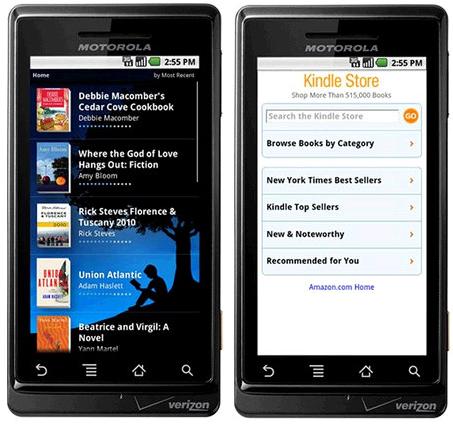
Many people enjoy reading for different reasons. Be it to relax, laugh, or soak up information, Kindle strives to help get that reading done without having to lug around heavy books. All you need is your Android phone and the Kindle app (iOS, Windows Phone, and BlackBerry apps also available), and you're set. You can now read wherever you are without carrying heavy books around.

Now, you get that you can read with the Kindle app, but there is much more to it. Kindle allows you to browse over 950,000 books, as well as newspapers and magazines, and read them on your device. Although some books are free, most cost close to $10.

The reading experience is also great, as you can change font size, search inside the book, and instantly look up hard words with the built in dictionary. The Kindle app's Whispersync technology means that the page you are on, any notes you took, and bookmarks are automatically synced with any other Kindle apps you have on other devices, as well as on the actual Kindle device itself, so you never miss a word.

So, if you're running Android and enjoy reading, the Kindle app is a great, free download.

Samsung introduces ChatON Instant Message Service

Monday, August 29, 2011

Samsung is getting into the market that Apple, the maker of the iPhone, RIM, the maker of the BlackBerry, and Facebook are already in. Samsung, the maker of many popular mobile phones, "smart" and otherwise, introduced it's ChatON instant messaging service.

The ChatON service will allow users to send short messages to each other for free, including texts, photos, contacts, and calendar. The service will be available at first on Samsung devices running their "semi-smart" mobile operating system, called Bada.

A Samsung
device running Bada.
The service will later come as an app on Android and iOS devices. While the users of the Bada version will get the basic capabilities mentioned above, the users of the Android and iOS app will get some more advanced features, such as commenting on their friends profile pages, create special "animation messages", and keep track of how often they instant message.

Ho Soo Lee, Head of Media Solution Center at Samsung Electronics, said in a statement, "With ChatON, Samsung has vastly simplified mobile communication by allowing users to connect to our upcoming feature phones and all major smartphones in the market. Users around the world can now enjoy easier and richer interactivity with whoever they want, in the format they want."

While the ChatON service seems like a pretty good idea, like I mentioned at the beginning of the post, Samsung is competing with some pretty big contenders. RIM's BlackBerry Messenger was recently revamped to become more "social", Apple has a similar service coming out soon on all iOS devices, called iMessage, and of course Facebook, with more than 750 million users, recently launched it's Facebook Messenger app for iOS, so Samsung's app will have to be pretty good to compete.

Samsung's ChatON service will make it's official debut later this week at Berlin's IFA Conference, and will be available in over 120 countries with 62 languages.

So, the ChatON service has a lot to compete with, but it's one of the only services available on more than one platform, with it's Bada, iOS, and Android apps. Overall, it seems like a great service, and I wish it luck in succeeding in the large world of IM services.

More information available in the below video.


Fusion Garage's Latest Creation (Update)

Wednesday, August 17, 2011

Fusion Garage is a company founded in 2008 with a vision to revolutionize mobile computing. At first, the company's idea was to use the browser as an operating system, similar to Google's Chrome OS. The difference between Fusion Garage's idea and Chrome OS. Is that Fusion Garage wanted to implement their idea on a tablet computer. They did.

The JooJoo tablet was created, a $499 tablet that ran an OS similar to a browser. All the apps you one were merely websites, and, although there are some extremely powerful and productive web apps, it just wasn't enough to keep Fusion Garage's JooJoo tab afloat.

The Grid 10 Tablet
As JooJoo died off, Fusion Garage was quietly planning something else. Something they thought would be big.
Something they call Grid.

The company recently introduced the Grid brand of products. The two devices that are currently up on their  website, the Grid 10 tablet and the Grid 4 phone, run Fusion Garage's new, Android based operating system, GridOS. GridOS is an individual operating system built on top of Android that provides a completely different user interface.

Although there is not much info about GridOS on the Fusion Garage website. The folks over at Engadget got a sneak peek preview, and we got to see a little more about the operating system. Firstly, the UI is very much based on the clean, simple grid-based style. It's a style that looks nothing like Apple's iOS or Google's Android. However, it does very slightly resemble the clean and simple look of Windows Phone 7. Also, the operating system comes with an emulator that allows it to run Android apps, although you'll have to download the apps from somewhere besides for the Android Market, as GridOS does not support.

The Grid 10 tablet device is available for pre-order now, but, at $499 for the 16GB WiFi only version, it's not cheap. However, you will get some great features such as data sync between any Grid devices, as well as the Grid desktop app for your desktop or laptop computer. The 10 inch tablet sports a sleek design, a high resolution display, and a front facing camera.

The Grid 4 Smartphone
The Grid 4 smartphone, not yet available to order, also will run Grid OS, and, like the tablet, sports a sleek and attractive design. The 4 inch phone has a 800 x 430 resolution, as well as a front and rear facing cameras. It will go for $399 unlocked. Carriers will be announced closer to the fourth quarter release date.

Overall, these two devices are sleek and simple, and, running an OS that is also sleek and simple, they may have a chance in the tablet and smartphone market. The problem with any tablet is the lack of apps, and, although Grid will have a native app store later this year, the fact that Android apps are supported is a great advantage.


(UPDATE: FusionGarage has lowered the price of the Grid10 by $200, making the entry-level version only $299)

Google to Buy Motorola Mobility

Monday, August 15, 2011

Motorola is known by many for it's numerous advancements in the technology of the cellular phone. For one thing, it was the creator of the first cell phone ever made. That two pound "brick" didn't last too long, and now, after Motorola created some of the most popular Android phones, Google feels the need to buy them.

In a press release put out earlier today, Google said that they were going to buy Motorola Mobility Holdings, Inc. for $40 a share, adding up to about $12.5 billion. $12.5 billion is quite a lot of money, however, Google does have some really deep pockets.

The deal will be made official at an announcement later today.

Now that the facts have been said, one would have to think about the reasoning that Google would want to make such a purchase.

Larry Page, Google's CEO, said the following about the purchase:

      "Motorola Mobility's total commitment to Android has created a natural fit for our two companies. Together, we will create amazing user experiences that supercharge the entire Android ecosystem for the benefit of consumers, partners and developers. I look forward to welcoming Motorolans to our family of Googlers."

From Page's statement, it seems that this deal has something to do with the people working at Motorola, as well as the partnership that Google and Motorola already have.

From the press conference, it doesn't seem like Android will see many changes because of this buy. Also, Google says they will continue to run Motorola as a separate business. 

So, although it seems the end user won't be too affected by this, we really won't know for a while. We'll just have to wait and see what happens. And hope for the best.

Read the full press release here.

Apple TV, Entertainment made Simple

Monday, August 1, 2011

When looking for a device that hooks up to your TV that streams movies and other content to the big screen, there are quite a few choices. These devices are called set-top boxes, and there are at least 10 well know and popular devices, with prices ranging from $55 to $299.

So if you're looking for a good set-top box, one that combines a pretty good price with a slick interface and great content selection, Apple thinks they have the device for you.

The Apple TV is a $99 device that allows you to stream content directly from the Internet. Unlike some of the other options, the Apple TV has no built in storage, so, while you can connect via a network to iTunes on your computer and stream content from there, everything else is just streaming it directly from the "cloud".

The Apple TV can access and stream movies and TV shows from the iTunes store. However, there is no way to purchase movies, only to rent them. An update out today allows users to buy TV shows directly, and stream them on demand from wherever they are. Users can also access and listen to or watch free podcasts, as well as access Apple's "Radio" feature.

Besides for Apple's own iTunes content, users can access content from Netflix, YouTube, and with this latest update, Vimeo. Netflix, which we have mentioned in the past, allows instant streaming of thousands of movies and TV shows, for a price that, at $7.99 a month, is probably cheaper than consuming all of your content via iTunes. YouTube and Vimeo, however, are free to use, and deliver a seemingly never-ending flow of great (and not so great) content.

And, if you aren't already watching way too much stuff, you can also watch every MLB or NBA game live with a subscription to MLB.tv or NBA.com League Pass Broadband. Both of these services are a little pricey, and you might run into blackout restrictions if the game you are trying to watch is available on "real TV" in your area.

Apple TV's Small Size
But of course, there's more. Connecting your Apple TV to your computer running iTunes over WiFi will allow you to stream your entire music collection through your home theater setup. Pictures from your computer can also be viewed on your big screen TV.

To top it all off, the Apple TV can stream content playing on any iOS device (iPhone, iPad, iPod touch). To stream this content on the big screen, all you have to do is tap the "AirPlay" button, and, after initial setup, the content will suddenly be playing on the big screen.

At $99, and a 3.9 inch square size, the Apple TV seems like a great buy, and the recent update that adds Vimeo and TV show purchasing definitely makes it even more compelling. If you're in the market for a set-top box, and you have 100 bucks to spare, the Apple TV is a great choice for you.

Ask Gadgetator: 3D on Tablets

Tuesday, July 26, 2011

Ever had something you wanted an extra opinion on. Or maybe you just want some help getting along in this ever complex world of technology. Here's your chance to Ask Gadgetator. Send any tech related questions to gadgetatorblog@gmail.com, and type "Ask Gadgetator" in the subject line, and your question may be featured in a Ask Gadgetator post.

This question comes from "technologyftw" and deals with 3D on phones and tablets.

Question: What do you think of 3D on the G-Slate? Should tablets move towards head-tracking 3D or the kind of 3D on the Evo 3D and Thrill 4G. -technologyftw

Answer: 3D itself seems sort of gimmicky. It’s great in theaters, and okay on a 50 or 60 inch television. Smaller than that, just doesn't really work well. The most obvious reason that 3D gets better as it the picture gets bigger, is because 3D really needs to fill your field of view.

In real life, your entire vision is seen in 3D. This seems natural. Once you get it down even to a theater size, It seems less natural, because the 3D you are seeing onscreen is different that the 3D that the chair in front of you is. “Artificial 3D” is more 3D seeming than what you see in real life. Therefore the sudden change from artificial to natural 3D can look unnatural.

Television 3D is worse. With a theater, at least it fills up the majority of your field of view. With a TV, it only fills up a small part of your field of view, so the transition between artificial and natural 3D is less natural looking.

Once you get down to the 3 or 4 inch screens on a phone, or even the 9 or 10 inch screens on a tablet, the 3D just won’t look as good. It barely fills your field of view, and therefore just doesn’t look natural.

Movie theaters, 3D is good, TV’s, it’s okay, but on a phone or tablet, 3D is just a gimmick to make you buy the product.

My answer to your question is that tablets should not move towards head tracking or any other kind of 3D, and should stick with the good old two dimensions that we have grown to know and love.

Mac OS X Lion is Out: How to Get It

Wednesday, July 20, 2011

Click here to see why you'd even want Mac OS X Lion.

After many rumors, Mac OS X Lion, Apple's latest edition of their Mac operating system, is finally out. And if you have a Mac computer of any kind, you probably want to upgrade to the newer, better OS. The good thing is, it's never been easier. Or cheaper. Unlike previous versions of Mac OS X, Lion is only a $29.99 download, and you basically get licenses for as many computers as you want.

Firstly, you must make sure that your Mac is compatible with Lion. To do this, click on the small Apple logo in the top left corner of your screen, a menu will come down, and select "About This Mac". A box will appear. Look under the "Software Update" button where it says "Processor". If the processor you have is a Core 2 Duo, Core i3, Core i5, Core i7, or Xeon, then your Mac is ready to Lion it up. Almost.

About This Mac
Next, while staying on that same About This Mac screen, is to check if your operating system is ready to upgrade. Immediately above the "Software Update" button it will show a version number. If your version is 10.6.8, you can skip to the next paragraph, if not, read on. If the version number is starts in 10.6. but is not 10.6.8, click the "Software Update" button below. This will update your Mac to the latest version of OS X Snow Leopard. If your version number starts with anything besides for 10.6, you have to get Snow Leopard, (Version 10.6) by buying it for $29.99 here. Once you've upgraded to Snow Leopard, you are ready to go.

Click here to open up the Mac OS X Lion page, and click "View in App Store". If you are running the latest version of Snow Leopard, that should bring up the Mac App Store, in which you can simply click "Buy". Mac OS X Lion is a pretty large download, so it could take a few hours, or even more. When done downloading, follow the instructions shown on the screen, which should be pretty straightforward. When you are done, you'll have Lion.

Hoped you enjoy. Any problems with the install? Have any other questions? Pop me a comment below, and I'll get back to you ASAP.

Amazon Announces Kindle Textbook Rentals

Monday, July 18, 2011

One of the major things that is keeping students around the world paper-free, is the fact that textbooks just aren't available on electronic devices. Well, weren't. Amazon, the creator of the popular Kindle eReader device, announced today that they would be launching a textbook rental service, and claims that students can save up to 80% on their textbooks.

"Today, Amazon.com announced the launch of Kindle Textbook Rental," Said the Amazon.com press release, "Now students can save up to 80% off textbook list prices by renting from the Kindle Store. Tens of thousands of textbooks are available for the 2011 school year from leading textbook publishers such as John Wiley & Sons, Elsevier and Taylor & Francis. Students can find details about the program at www.amazon.com/kindletextbooks"

The Kindle textbooks can be rented anywhere from 30 to 360 days, so students really have flexibility. Also, like other Kindle books, these are, as Amazon.com calls it, "Rent once, read anywhere". This means that you can read a Kindle textbook on, of course, the Kindle device, as well as the Kindle app for iPhone, Android, and even for the Mac and PC.

This seems extremely convenient, however, although Amazon is claiming prices up to 80% than hardcover books, that is not countering in the fact that many people can sell used textbooks after using them, and earn back a percentage of what they paid originally.

Do you think it's worth the convenience to lose the reselling value? Are you going to be using this new Kindle feature? Let me know by simply commenting below. Thank you.

5 iPhone Apps you Need: App 5

Thursday, July 14, 2011

This is the last post in a series of five. Read the fourth post here.

I don't have to go over it again. But I will. So you're managing your money, cooking, listening to music, and traveling to the Chumbe Islands, now that you've done all this, you probably want to sit down and relax. And share pictures of your new-found stacks of money, your beautiful onion soup, you dancing around to that new band you just found out about, and of course, the wonderful vacation you just had. There's an app for that.

Instagram, recommended by my friend AJ Goren of TechLand, is available, for free, from Instagram.com. Instagram allows you to take photos with your iPhone or iPod touch's camera, and, after putting the photo through one of the many vintage filters, post it for all to see.

Instagram is not only a way for you to share photos, it's also a great way to find beautiful photos that others have taken, either by following a specific person, or by just browsing the popular section. You can also easily export your photos to Flickr, Facebook, and Twitter.

One of the biggest parts of Instagram is the filters. Although you can keep a photo "normal" there are also many filters that make the photo look like it was taken before today's technology existed.

You can download Instagram at Instagram.com, or directly from the AppStore. I hope you enjoy Instagram, and I hope you enjoyed this entire five part series.

Help Gadgetator by simply clicking on one of the sharing icons below. Also, like Gadgetator on Facebook by clicking the "like" button near the top right corner of the page. Happy sharing!

5 iPhone Apps you Need: App 4

Tuesday, July 12, 2011

This is the fourth post in a series of five. Look out for the fifth on Thursday, July 14th. Read the third post here.

Now that you're cooking, managing your budget, and listening to music all at the same time, it's time you took a break and traveled to Chumbe Island in Zanzibar (Where else?). Now, when someone goes to Chumbe Islands, they want to do it right. The right flights, the right hotels, and the right rental cars. All at the right price. Kayak is here to help.

From Kayak.com, this free app allows you to look for hotels, flights, rental cars, as well as keep track of your trip with their My Trips feature, although some features require a free Kayak.com account.

When you first launch the app, you see a list off features to take advantage of. You can look for hotels, flights, and rental cars, as well as look at your planned trip agenda (which you set by emailing your booking conformations to Kayak). You can also track flight times, get price alerts on rates, and call airlines directly from the airline directory.

Although Kayak does not do the booking itself, it allows you to book a hotel, flight, or rental car either directly from the company, or through a few booking services.

If you're traveling anytime soon (even if it's not to Chumbe Islands), you might want to check out Kayak. It's free, and you can learn about it from Kayak.com, or download it directly from the AppStore. Free's always good, so check it out.

Help Gadgetator by simply clicking on one of the sharing icons below. Also, like Gadgetator on Facebook by clicking the "like" button near the top right corner of the page. Happy sharing!
 

Search This Blog

Subscribe to Gadgetator by eMail

Most Popular

About the Author

Elazar Krausz founded Gadgetator in December 2010, and has been writing there ever since. To find out more, click below.
Online Marketing
Add blog to our blog directory.