Showing posts with label review. Show all posts

Guest Post: Wondershare PDF Editor

Thursday, April 26, 2012

Guest post by Catherine Lee

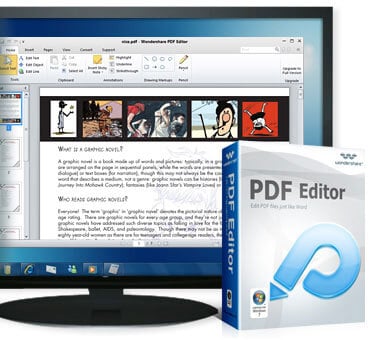
In the business world the most widely used format for sending and receiving data is the PDF. To edit PDF documents, we need to have an editor specially created for editing PDF documents. Wondershare PDF Editor is a very useful tool used for editing PDF files easily and efficiently by using a set of intelligent algorithms. It enables users to edit PDF files like they would using a word processor, with a simple user interface. The user can understand the program easily and use this it for any business purpose. Currently in the market, there are several PDF Editors available. But how is Wondershare PDF editor different than all the others out there? 

 PDF Editor
The difference between other editors and Wondershare is having the functionality of more expensive Nitro or Adobe products, nested within a scaled-down, minimalist, more intuitive design framework. You can edit and insert many objects, like images, hyperlinks, and more very easily. 


The main key differences that make Wondershare PDF Editor stand out are:  

  • User friendly interface.
  • Less clutter
  • Every feature offered by the editor is directly available to you. No need to search around the menus.
There are many unique features found in Wondershare PDF Editor. These include:
  • Unique Style Of Annotation:  You can effectively maintain various types of elements with intelligent behavior of Wondershare PDF Editor..
  • The Total Text Editing feature is very useful for editing text, easy alignment, and having the Word environment.
  • Objects like images of any format, links, tables, and more can be easily added, modified and rendered.
  • One click conversion to a Word document of any format (2003, 2007, 2010).
  • Support for 17 languages.
  • You can easily split and merge PDF documents.
The system requirements for running Wondershare PDF Editor are:
  • For Windows: Windows XP/Vista/7 32Bit
  • For Mac: Mac OS X 10.5, 10.6 or 10.7(Lion)

You can get Wondershare PDF Editor at Wondershare.com/pdf-editor. For Windows, it is totally free to use Wondershare PDF Editor beta with full feature for 100 days. You can also download PDF Editor beta to update it to the upcoming paid version for 50% off. For Mac, You can Try or Buy it for $49.95 (Version 1.6.0)

PressReader brings 2100+ Newspapers Directly to You

Monday, April 9, 2012

The world is moving away from traditional mediums. Fast. Mail have become email. Phone calls have become Skype. And now newspapers are slowly going digital. But going to each newspaper or magazine's website or app can be difficult and inconsistent. That's where PressReader comes in.

PressReader is a multi-platform service that brings over 2100 newspapers and magazines directly to your iPhone. Or any other platform you could think of. PressReader offers apps for Android (Gingerbread or Honycomb), the BlackBerry Playbook, the Apple iPad and iPhone, and both Windows Phone and Windows 7 Slate PC. They also offer apps for both Windows and Mac, as well as legacy versions for both BlackBerry phones and Windows Mobile phones. So, yeah, they've got an app for any device you'll ever use. And all the devices you'll never use. And they're all free apps.

But what exactly does PressReader do? It allows you to subscribe to and read specific newspapers and magazines on your device. They offer over 2100 newspapers from 95 countries and 54 languages. But it's not like they're all newspapers you've never heard of, from countries you've never been to, in languages you have no idea how to read. It's not like that at all. PressReader's got some big name newspapers, like The Washington Post, the Daily Mail, and USA Today, among many others.

Playing with the iOS version of the app, I found it simple and easy to use. It has a nice slider at the bottom of the page, allowing for users to swipe through specific sections of the newspaper. You can attempt to read the newspaper straight, by zooming in on the specific article you're interested in. However, tapping on a headline will bring up the story in an extremely easy-to-read format. Any continuations of the story on a different page will appear there, right below the first half of the story, as a convenience.

The iOS app allows you to print either the screen you are seeing, or the entire page in the newspaper via AirPrint. You can use text-to-speech to listen to your newspaper, and the voices used are surprisingly un-robotic, although they can err on certain things. For example, instead of saying "10 million dollars", when it sees $10M, it would say "10 dollars M".

The service costs $0.99 for a single download of one issue of any newspaper, or $29.95 a month for unlimited downloads. 

Overall, the app seems pretty nice. I found no shortage of reading material, and most of the newspapers I'm interested in were available, including my hometown paper, The Denver Post. The one paper obviously missing is The New York Times.

If you only read a couple newspapers and magazines regularly, checking to see if they have individual apps might be a good idea, as they'll be more personalized and work better with that specific paper than PressReader. However, if you read many papers regularly, or even if you just want to be able to look up an article any time someone mentions one, PressReader is a definite download.

$0.99 is not too bad for a single issue, but buying that every day might be a bit expensive. $29.95 a month is pretty expensive, and while it may be worth it if you're subscribing to many newspapers or magazines, if you just want to subscribe to one or two, it's probably too expensive. It'd be nice if there was some sort of middle ground where one could subscribe to one or two newspapers for something less than $30 a month, and more affordable than buying each issue for $0.99.

PressReader is a great service overall, there are a few flaws, but if you can get past them, PressReader could be a great way to digitize your newspapers, slowly shy away from paper, and simplify your newspaper and magazine consumption.
iPod Nano Watchbands

Sunday, November 20, 2011

Silicone Wrist Strap Watch Band for iPod Nano 6th Purple
The latest version of the iPod Nano, the 6th generation, is a pretty cool and sleek device, but from almost the day it came out, people have been using it as a watch face. The device is the right shape and size, and has a perfect clock feature built in. But you can't use a Nano as a watch without a watchband.

The original Nano watch band was made out of a cheap rubber material, and was more like a wristband than a watchband. Soon, more and more watchbands were being sold, and the iPod Nano watch evolved from a rubber bracelet, to something you'd expect to find on a regular watch.

If you have a 6th generation iPod Nano, and want to use it as a watch, we'll go through the best bands at the best deals.
The HEX Original Watch Band

1. The HEX Original Watch Band

This is the simple, but high quality watch band. Available in nine different colors, there's sure to be one that matches your taste. The HEX features a silicone strap, an easy pop-in, pop-out design, and even has built in button controls. At $29.99, the HEX isn't the cheapest option out there, but it looks cool, functions well, and is an all-around good deal. You can pick one up at shophex.com or at Amazon.

2. The iWatchz Timepiece Leather Watch Band

Timepiece Collection - Light Brown LeatherThe iWatchz Timepiece is a more high end watchband model, and features a beautiful leather band, unlike the HEX, the iWatchz itself doesn't cover the iPod's buttons and use buttons of it's own, rather it uses a "unique patent-pending clip system that uses the iPod Nano's own built-in clip". This makes the watch look a lot more elegant, especially if you have a Nano with a not-so-colorful color. The beautiful design, however, does not come without a price tag, and this band will set you back $89.95. The iWatchz Timepiece is sold at iWatchz.com, or at Amazon.

3. The LunaTik Lynk

Lynk_product2
Probably the most high end watchband out there, the LunaTik Lynk is an extremely elegant watchband that would easily pass for a regular watch. Made of aerospace grade aluminum, this watch band is both sturdy and beautiful. The Lynk is available in silver and blackout, at $129.95 and $139.95 respectively. The beautiful design will match even the nicest, most elaborate clothing. It is not available immediately, but can be picked up for pre-order at LunaTik.com.

In this article, we cover three great watchbands in three different price ranges. However, there are many more great watchbands that may fit your needs better. Before making your purchase decision, please check out the websites of the companies we covered in the article, to view their wide selection of watchbands. The websites are shophex.comiwatchz.com, and lunatik.com.

Have any other watchbands you've tried and like? Tried any of the bands we covered? Like them? Hate them? Leave a comment below with feedback.

5 Android Apps you Need: App 5

Monday, September 19, 2011

This is the final post of a five part series. Read the fourth post here.

So we've been pretty productive with our first four apps, and it's time to have some fun. If you follow sports of any kind, this free app from ESPN.com, is a great download. Called ESPN ScoreCenter, the app puts sports news, videos, scores, and more, in the hand of the user.

The app allows you to what's going on in tens of different leagues, including the big ones like NFL, MLB, and NBA, and the smaller ones, like Formula 1, NCAA Water polo, and Cricket. The app offers live scores, news, videos, and more for free, ad-free, from ESPN.

LauncherPro for Android
Although the design's not the prettiest, it's definitely a lot better than many other apps, making this sports-lover's app a sure download. It can be downloaded for free from the Android Market, or ESPN.com.

Now, I promised in the App 2 post that App 5 would contain a special bonus app. So, here goes.

Everyone knows that User Interface design isn't one of Android's strong points. It may be a powerful system, but iOS leaves Android in the dirt as far as UI. The good thing about Android, is that you're not stuck, and here's an app that'll make your phone just a little more pretty.

A free app from a developer named Federico Carnales, LauncherPro completely changes the look of your Android device, hopefully for the better. It is also extremely customizable, so check out the pics below, and see if you like it. If you do, it's a free download from the Android Market.


Hope you enjoyed this series, bye for now.


5 Android Apps you Need: App 4

Thursday, September 15, 2011

This is the fourth part of a five part series. Read the third post here. Check back next Monday for the last part of the series.

The only thing you really can't live without is food, and grocery shopping is never such a fun experience. Make it easier with Grocery iQ, a free app from Coupons.com, which allows you to create personalized shopping lists, get free coupons, and much more.

Coupons on Grocery iQ
When starting with Grocery iQ, you make a list of all of the stores you shop at, and then personalize the aisles in each store, so you know which store has which aisles. Although this is a slightly tedious process, when you're done with it, it's worth it.

You then add grocery items to your list, and add each item to one or more of the stores on your list, and specify which aisle each item is located in. When you then go shopping, you simply click the name of the store, and you see the list of all of the items you need at that store, and which specific aisle it's located in, making your shopping experience a lot more enjoyable.

A great feature of this app is the syncing feature. Grocery iQ also has apps available online and for iOS, so if you have any other device with Grocery iQ, your lists can be automatically shared, and when anyone else with Grocery iQ buys an item, it gets automatically synced with any other users using the same account as you. This makes it great for families, as both a mother and father can share a list on different devices.

Since Grocery iQ comes from Coupons.com, free coupons are integrated to the app, also an extremely convenient feature.

If you eat food, (and I know you do), you need Grocery iQ, so download it for free today, from groceryiq.com or the Android Market.

Hey Twitter users! If you're on Android, check out Plume for Twitter!

5 Android Apps you Need: App 3

Monday, September 12, 2011

This is the second part of a five part series. Read the second post here. Look out for more every Monday and Thursday.

Welcome back to 5 Android Apps you Need. Now that you're reading and chatting, it's time to get some watching done. Netflix, a free app from Netflix.com, allows users to stream thousands of movies and TV shows, with a small monthly fee.

We've talking about Netflix a few times before, but never really in detail. Also, we've never talked about the mobile app, so here goes.

With a $7.99 a month Netflix subscription, users can choose from thousands of movies and TV shows to stream, ad-free, immediately. Although Netflix has a lot of movies for those who like less popular stuff, it also has it's fair share of the more popular content as well, including Mad Men, Super 8, and Secretariat. There's also plenty of stuff for the kids, including, SpongeBob SquarePants, Toy Story 3, and Blue's Clues.

Netflix is also available on, well, almost any device you can think of (Click here for a complete list). A $7.99 subscription gives you access to the Android app, as well as all of the other devices Netflix is available on, and with Netflix's huge collection of content, it's definitely a good deal.

With Netflix's great Android app, huge collection, and free 30 day trial (available at Netflix.com), there's no reason not to try it. The app's free, so give it a download.   

5 Android Apps You Need: App 2

Friday, September 9, 2011

This is the second part of a five part series. Read the first post here. Look out for more every Monday and Thursday (Hopefully).

First off, I'd like to apologize. I had written "Look out for more every Monday and Thursday." in my first post on Monday. Come Thursday, and my next post isn't up. Today is Friday. This is the post that was supposed to be published on Thursday. I plan on being on time, next Monday and next Thursday. Also, to make up for it, App 5 will contain a special bonus app. (If I don't forget.)

Now that that has been taken care of, we can proceed. The second Android app I'm covering in this series is called Skype. Available for free from Skype.com, the Skype Android app allows users to chat with audio or video to any other Skype user. Skype can also be used to any phone number for a small fee. 

To use Skype, you must have a Skype account, also free from Skype.com. Skype is also available on many other platforms, including iOS, Mac OS X, and Windows. This means that you can chat with users from your phone, even if they are at their computer. 

Skype is a great download, as it allows you to video-chat from anywhere, stay connected on the go, and even have meeting while you are away, allowing for more vacation. 

Skype is great for business, great for personal use, and great for you. Also, since it's free, you have nothing to lose. Download the Skype Android app today.

5 Android Apps you Need: App 1

Monday, September 5, 2011


This is the first part of a five part series. Check back every Monday and Thursday for more.

If you've been reading Gadgetator regularly, you probably know about the 5 iPhone Apps you Need series we did a while back. Although iPhone may be slightly more popular than Android, I never like to be biased, so here's... 5 Android Apps you Need.


iOS, the operating system behind the iPhone, iPad, and iPod touch, has always been known for it's large number of apps available. However, with Android's success over the past few years, it's app numbers have been slowly creeping up, and it's getting hard to choose the great apps from the not so great ones. Here's a little  bit of help, as I, over the next few weeks, will highlight 5 of the best apps for your Android device.

The first app in this series, called Kindle, is available for free from Amazon.com, as well as a free download from Google's Android Market.

Many people enjoy reading for different reasons. Be it to relax, laugh, or soak up information, Kindle strives to help get that reading done without having to lug around heavy books. All you need is your Android phone and the Kindle app (iOS, Windows Phone, and BlackBerry apps also available), and you're set. You can now read wherever you are without carrying heavy books around.

Now, you get that you can read with the Kindle app, but there is much more to it. Kindle allows you to browse over 950,000 books, as well as newspapers and magazines, and read them on your device. Although some books are free, most cost close to $10.

The reading experience is also great, as you can change font size, search inside the book, and instantly look up hard words with the built in dictionary. The Kindle app's Whispersync technology means that the page you are on, any notes you took, and bookmarks are automatically synced with any other Kindle apps you have on other devices, as well as on the actual Kindle device itself, so you never miss a word.

So, if you're running Android and enjoy reading, the Kindle app is a great, free download.

5 iPhone Apps you Need: App 5

Thursday, July 14, 2011

This is the last post in a series of five. Read the fourth post here.

I don't have to go over it again. But I will. So you're managing your money, cooking, listening to music, and traveling to the Chumbe Islands, now that you've done all this, you probably want to sit down and relax. And share pictures of your new-found stacks of money, your beautiful onion soup, you dancing around to that new band you just found out about, and of course, the wonderful vacation you just had. There's an app for that.

Instagram, recommended by my friend AJ Goren of TechLand, is available, for free, from Instagram.com. Instagram allows you to take photos with your iPhone or iPod touch's camera, and, after putting the photo through one of the many vintage filters, post it for all to see.

Instagram is not only a way for you to share photos, it's also a great way to find beautiful photos that others have taken, either by following a specific person, or by just browsing the popular section. You can also easily export your photos to Flickr, Facebook, and Twitter.

One of the biggest parts of Instagram is the filters. Although you can keep a photo "normal" there are also many filters that make the photo look like it was taken before today's technology existed.

You can download Instagram at Instagram.com, or directly from the AppStore. I hope you enjoy Instagram, and I hope you enjoyed this entire five part series.

Help Gadgetator by simply clicking on one of the sharing icons below. Also, like Gadgetator on Facebook by clicking the "like" button near the top right corner of the page. Happy sharing!

5 iPhone Apps you Need: App 4

Tuesday, July 12, 2011

This is the fourth post in a series of five. Look out for the fifth on Thursday, July 14th. Read the third post here.

Now that you're cooking, managing your budget, and listening to music all at the same time, it's time you took a break and traveled to Chumbe Island in Zanzibar (Where else?). Now, when someone goes to Chumbe Islands, they want to do it right. The right flights, the right hotels, and the right rental cars. All at the right price. Kayak is here to help.

From Kayak.com, this free app allows you to look for hotels, flights, rental cars, as well as keep track of your trip with their My Trips feature, although some features require a free Kayak.com account.

When you first launch the app, you see a list off features to take advantage of. You can look for hotels, flights, and rental cars, as well as look at your planned trip agenda (which you set by emailing your booking conformations to Kayak). You can also track flight times, get price alerts on rates, and call airlines directly from the airline directory.

Although Kayak does not do the booking itself, it allows you to book a hotel, flight, or rental car either directly from the company, or through a few booking services.

If you're traveling anytime soon (even if it's not to Chumbe Islands), you might want to check out Kayak. It's free, and you can learn about it from Kayak.com, or download it directly from the AppStore. Free's always good, so check it out.

Help Gadgetator by simply clicking on one of the sharing icons below. Also, like Gadgetator on Facebook by clicking the "like" button near the top right corner of the page. Happy sharing!

5 iPhone Apps you Need: App 3

Thursday, July 7, 2011

This is the third post in a series of five. Look out for more every Tuesday and Thursday. Read the second post here.

So, in this series we have dealt with money management, as well as cooking. Now we're heading on to something less important in everyday life, but still something done by most people in the world, and that is listening to music. There are thousands of apps in the AppStore that are designed for doing just that. Some are paid services, some you just pay for the app, and some are completely free. This one app, called Pandora, is available for free from Pandora.com, and is one of the best apps dedicated to listening to music.

Pandora allows you to type in a song, an artist, or a genre, and it will automatically create a "radio station" based on what you entered. The station might play the song you entered first, and then go on to something of a similar style, or something by the same artist, every song has a thumbs up or thumbs down button, and Pandora will learn, as you go along, what kind of music you like.

Pandora has a clean and simple interface, one that looks very iOS-like. However, the only negative of Pandora is the ads. Advertisements appear when you open a station. Audio ads also come up every few songs played. If the ads really bother you, you can sign up for a premium account, and completely eliminate the ads.

Pandora is a great, free way to listen to music, and discover new artists and tracks too. If you aren't already using it, no better time to start. It can be downloaded from the Apple AppStore. You can also find out more at its website.


There are two more posts to this series, that's two more apps, any of which can be your suggestion. Leave a comment below telling me about your favorite iPhone App, and it might make it to the next post in this series. Plus, if you leave your name, and any website you want me to plug, I'll put it in in the post. Comment below!


Help Gadgetator by simply clicking on one of the sharing icons below. Also, like Gadgetator on Facebook by clicking the "like" button near the top right corner of the page. Happy sharing!

5 iPhone Apps you Need: App 2

Tuesday, July 5, 2011

This is the second post in a series of five. Look out for more every Tuesday and Thursday. Read the first post here.

Search on Epicurious
The first app was one that helped you with your finances, something that really applies to everyone. This app will also help you with something you can't avoid: eating. Of course you could eat in some restaurant for breakfast, lunch, and supper every day, but if you want to go the cheaper route, you've gotta cook. This free app from Epicurious.com will help you do just that.

I find it really fun to stop once in a while and cook. And for that you need recipes. And for that you need Epicurious. Epicurious.com has been around for a while, and packs in thousands of recipes, as well as articles, cooking videos, and user polls. The Epicurious app only deals with the recipes, but it does it well. Very, very well. The Epicurious app allows you to look for recipes by many categories, including the basics: lunches, dinners, and sides, but there are also some sometimes more useful categories, including I Cook like a ProI can Barely Cook, and Quick and Easy. 


Another cool feature is the advanced search option, where you start off choosing a main ingredient from a list of many options, listed in alphabetical order. You can then choose a meal or course, a cuisine, dish type, season or occasion, and even dietary consideration. All of this is presented in a beautiful and intuitive way, and is really fun and easy to use.

Epicurious is available at it's homepage, as well as on the iTunes AppStore. Thanks for reading, I have to go check on my Devil's Food Cake.

Help Gadgetator by simply clicking on one of the sharing icons below. Also, like Gadgetator on Facebook by clicking the "like" button near the top right corner of the page. Happy sharing!

5 iPhone Apps you Need: App 1

Thursday, June 30, 2011

This post is the first in a series of five. Look out for more every Tuesday and Thursday. Read the second post here.

So you just got a new iPhone. Or you've had an iPhone for a while, but you haven't really gotten into the hang of the app thing. Or you've had the iPhone for a while, and you've been downloading apps, but you just haven't heard of these. No matter what your situation is, you have an iPhone or iPod touch, you need to check out these cool apps.

The first app in this five app series is Mint. From mint.com, this free app is available in the App Store.

Mint.com
Once you become old enough to live by yourself, you're bound to be confused with all of your financial responsibilities. Be it the mortgage, your college loan, or the groceries. Mint.com's free app is here to help. Although you might feel worried giving Mint.com all of your personal finance information, Mint is using the same service to keep the information as most banks do, so you aren't really giving any information you haven't already given. Once you put in all of your info, Mint will help you create a budget, and really manage all of your  finance needs. Mint is free, safe, and a definite download for any iPhone user.

Help Gadgetator by simply clicking on one of the sharing icons below. Also, like Gadgetator on Facebook by clicking the "like" button near the top right corner of the page. Happy sharing!
 

Search This Blog

Subscribe to Gadgetator by eMail

Most Popular

About the Author

Elazar Krausz founded Gadgetator in December 2010, and has been writing there ever since. To find out more, click below.
Online Marketing
Add blog to our blog directory.