Google announces new apps for iOS (UPDATE)

Thursday, June 28, 2012

Google previewed a few new iOS apps at its developer's conference today, called Google IO, that will be rolling out on the App Store later today.

Google's popular web browser, Google Chrome, has long been a desktop app for Windows and Mac. It recently became available for Android devices, and today is available for iOS, on both iPhone and iPad. The iPad app looks extremely familiar to the desktop version, and the iPhone version shares the same design concepts as well. The app will support incognito browsing, and well as tab syncing between devices.

Apple launches separate Podcasts app

Tuesday, June 26, 2012

iPhone Screenshot 1
It was expected that Apple would take podcasts out of the iTunes app on the iPhone and iPad, and release a standalone app for podcasts in the latest version of their mobile operating system, iOS 6, which should be released this fall. Although Apple hasn't yet gutted podcasts from the iTunes app, they have given them a standalone app, straightforwardly called "Podcasts", ahead of the iOS 6 release. 

Flipboard now available on Android

Friday, June 22, 2012

Flipboard has been know as a great media consumption app on the iPad for a long time. It allows users to browse through personalized news in a minimalistic magazine-like design. The app became available on the iPhone more recently, and today, is available on Android devices via the Google Play store. Kindle Fire and Nook Tablet owners can also download it through their proprietary app stores.

Along with the new Android version of the app, Flipboard for iPad and iPhone also received updates. All versions of the app now support the social network Google+. In the past, a user could connect Twitter or Facebook, and news from those feeds would appear in Flipboard. With this new update, users can connect their Google+ account to the app, and items from that feed will appear in Flipboard. You can 1+ (Google+'s version of the Facebook "like") any post directly from the app, or tap to share, comment on, or reply to the post.

Samsung Galaxy S III hits the US

Thursday, June 21, 2012

The latest and greatest Android device has hit the US, a little less than a month after it reached Europe. The Samsung Galaxy S III is now available for purchase through T-Mobile. Other carriers will start selling the device within the next few weeks.

Samsung Galaxy S III - Marble White
The S III is an Android smartphone running the latest version of the mobile operating system, Android 4.0, or Ice Cream Sandwich. It features a large 4.8 inch HD Super AMOLED touchscreen, an 8 megapixel rear-facing camera, a 1.9 megapixel front-facing camera, 16 gigabytes of internal memory, 4G LTE service, and a quad-core CPU.

Microsoft announces Windows Phone 8

Wednesday, June 20, 2012

At its Windows Phone Summit today, Microsoft gave the press a sneak peek at the future of Windows Phone, their mobile smartphone operating system. The new Windows Phone operating system will be called Windows Phone 8.

Although there will be many new end user features in the new version of the operating system, Microsoft is focusing on some of the features that developers would care about in this announcement.


A large change in the latest version of Windows Phone is that the new OS will be based on the same core as the desktop version of Windows, so it should be easier for developers to write apps. This will also add some security features.

Google launches Google Offers iPhone app

Tuesday, June 19, 2012


Google has been serving up Groupon-style deals through their Google Offers service for over a year. They offer city-specific deals in each area they support, and allow users to buy these offers, and use them later. For example, a user would spend $15 for a voucher that can be used to buy $30 worth of t-shirts.

Spotify launches streaming radio service

Spotify, an online music streaming service that allows users to browse through a large catalog of music, and play any song on-demand, has announced today that it is getting the business of streaming radio. In the new Spotify iOS app, users will be able to choose a song, artist, album, or playlist, and Spotify will create a "radio" station based on that selection. The station will play songs that are similar to the selection made originally, and will alter its selections based on likes and dislikes users give to specific songs. This seems like an open attack at Pandora, which does exactly the same thing, and has been doing so for close to 6 years. 

Microsoft announces the new Surface tablet

Monday, June 18, 2012

Some Alt
Microsoft has always been a company devoted to creating great software. They are the makers of the Windows operating system, which runs on many devices, all manufactured by other companies. The company has announced today that it will no longer rely solely on partners to create the devices that run their operating system.

Microsoft announced a tablet today, that will run on the latest edition of Windows, Windows 8. This device will be manufactured directly by Microsoft. Windows 8 is thought to be the first version of the popular operating system that is really fit for tablet devices, and it seems to make sense that Microsoft would create a device that fit well with the new operating system.

Guest Post: Wondershare PDF Editor

Thursday, April 26, 2012

Guest post by Catherine Lee

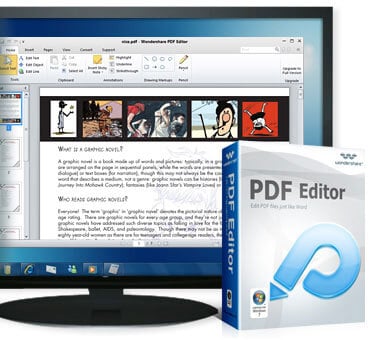
In the business world the most widely used format for sending and receiving data is the PDF. To edit PDF documents, we need to have an editor specially created for editing PDF documents. Wondershare PDF Editor is a very useful tool used for editing PDF files easily and efficiently by using a set of intelligent algorithms. It enables users to edit PDF files like they would using a word processor, with a simple user interface. The user can understand the program easily and use this it for any business purpose. Currently in the market, there are several PDF Editors available. But how is Wondershare PDF editor different than all the others out there? 

 PDF Editor
The difference between other editors and Wondershare is having the functionality of more expensive Nitro or Adobe products, nested within a scaled-down, minimalist, more intuitive design framework. You can edit and insert many objects, like images, hyperlinks, and more very easily. 


The main key differences that make Wondershare PDF Editor stand out are:  

  • User friendly interface.
  • Less clutter
  • Every feature offered by the editor is directly available to you. No need to search around the menus.
There are many unique features found in Wondershare PDF Editor. These include:
  • Unique Style Of Annotation:  You can effectively maintain various types of elements with intelligent behavior of Wondershare PDF Editor..
  • The Total Text Editing feature is very useful for editing text, easy alignment, and having the Word environment.
  • Objects like images of any format, links, tables, and more can be easily added, modified and rendered.
  • One click conversion to a Word document of any format (2003, 2007, 2010).
  • Support for 17 languages.
  • You can easily split and merge PDF documents.
The system requirements for running Wondershare PDF Editor are:
  • For Windows: Windows XP/Vista/7 32Bit
  • For Mac: Mac OS X 10.5, 10.6 or 10.7(Lion)

You can get Wondershare PDF Editor at Wondershare.com/pdf-editor. For Windows, it is totally free to use Wondershare PDF Editor beta with full feature for 100 days. You can also download PDF Editor beta to update it to the upcoming paid version for 50% off. For Mac, You can Try or Buy it for $49.95 (Version 1.6.0)

PressReader brings 2100+ Newspapers Directly to You

Monday, April 9, 2012

The world is moving away from traditional mediums. Fast. Mail have become email. Phone calls have become Skype. And now newspapers are slowly going digital. But going to each newspaper or magazine's website or app can be difficult and inconsistent. That's where PressReader comes in.

PressReader is a multi-platform service that brings over 2100 newspapers and magazines directly to your iPhone. Or any other platform you could think of. PressReader offers apps for Android (Gingerbread or Honycomb), the BlackBerry Playbook, the Apple iPad and iPhone, and both Windows Phone and Windows 7 Slate PC. They also offer apps for both Windows and Mac, as well as legacy versions for both BlackBerry phones and Windows Mobile phones. So, yeah, they've got an app for any device you'll ever use. And all the devices you'll never use. And they're all free apps.

But what exactly does PressReader do? It allows you to subscribe to and read specific newspapers and magazines on your device. They offer over 2100 newspapers from 95 countries and 54 languages. But it's not like they're all newspapers you've never heard of, from countries you've never been to, in languages you have no idea how to read. It's not like that at all. PressReader's got some big name newspapers, like The Washington Post, the Daily Mail, and USA Today, among many others.

Playing with the iOS version of the app, I found it simple and easy to use. It has a nice slider at the bottom of the page, allowing for users to swipe through specific sections of the newspaper. You can attempt to read the newspaper straight, by zooming in on the specific article you're interested in. However, tapping on a headline will bring up the story in an extremely easy-to-read format. Any continuations of the story on a different page will appear there, right below the first half of the story, as a convenience.

The iOS app allows you to print either the screen you are seeing, or the entire page in the newspaper via AirPrint. You can use text-to-speech to listen to your newspaper, and the voices used are surprisingly un-robotic, although they can err on certain things. For example, instead of saying "10 million dollars", when it sees $10M, it would say "10 dollars M".

The service costs $0.99 for a single download of one issue of any newspaper, or $29.95 a month for unlimited downloads. 

Overall, the app seems pretty nice. I found no shortage of reading material, and most of the newspapers I'm interested in were available, including my hometown paper, The Denver Post. The one paper obviously missing is The New York Times.

If you only read a couple newspapers and magazines regularly, checking to see if they have individual apps might be a good idea, as they'll be more personalized and work better with that specific paper than PressReader. However, if you read many papers regularly, or even if you just want to be able to look up an article any time someone mentions one, PressReader is a definite download.

$0.99 is not too bad for a single issue, but buying that every day might be a bit expensive. $29.95 a month is pretty expensive, and while it may be worth it if you're subscribing to many newspapers or magazines, if you just want to subscribe to one or two, it's probably too expensive. It'd be nice if there was some sort of middle ground where one could subscribe to one or two newspapers for something less than $30 a month, and more affordable than buying each issue for $0.99.

PressReader is a great service overall, there are a few flaws, but if you can get past them, PressReader could be a great way to digitize your newspapers, slowly shy away from paper, and simplify your newspaper and magazine consumption.
 

Search This Blog

Subscribe to Gadgetator by eMail

Most Popular

About the Author

Elazar Krausz founded Gadgetator in December 2010, and has been writing there ever since. To find out more, click below.
Online Marketing
Add blog to our blog directory.