Google Currents: News made Beautiful

Sunday, December 11, 2011

Google recently announced their new news-aggregation application, called Google Currents. Currents allows users to browse many content providers (magazines, blogs, etc.), and add them to their Currents, where they would have easy access to their articles, as well as a beautiful way to browse what might interest you. Currents is available as a free app for iPhone and iPad, as well as both Android phones and tablets.

To add a publication, called by currents an "edition", you simply search for the content you want, or find it using the "featured" section, or from any of the categories, and add it to your currents. However, as this is a fairly new service, don't expect to find every publication that you read. Once you have added all of your desired editions, you can tap on any of them to view the content in a beautiful, minimalist design. 

Publishers can add content via a simple webpage, and can choose to add more than just simple articles. Publishers can add an updating section based on an RSS feed, a photo section that pulls in from Flickr, a video section hooked up with YouTube, and even a social update section, with updates pulled in from Google+ or any other RSS or Atom feed.

Google Currents already has many great publishers using the service, including PBS, The Guardian, and Zagat, as well as many well-known online blogs. There is no cost to subscribing to any of the editions associated with Currents. Users can also import any RSS feed, as well as easily import their Google Reader subscriptions, to quickly fill the application with relevant content. 

The one thing that makes Currents stand out the most from any other news service is the design. Google Currents' design is simple and elegant, making things easy to see, and making using the app an overall enjoyable experience. The one slightly disconcerting thing about the design and user interface is that, once in an edition, you can basically scroll sideways endlessly, as each article in an edition is laid out one after another, with the only thing distinguishing one article from another being the article's title. Although this works if you think of the content as a magazine, it can be confusing if you think as each article being a separate post. 

Google Currents is currently not available outside the United States. It would make sense for Google to have plans to roll the service out elsewhere, but no such plans are released at this point, so those outside the United States will just have to wait and see. 

Google Currents is free, so what is there to lose by trying it out? Download Google Currents for your iPhone, iPad, Android phone, or Android tablet, and, while you're at it, add Gadgetator to your list of followed editions by searching for us.

Watch the video below for more information about Google Currents.

Chrome OS: One Year Later

Wednesday, December 7, 2011

PhotoI never really imagined this day coming. But it's here. It's one year after Gadgetator's first post ever. So much has happened since them, and a big thanks goes out to Leo Laporte, host of the nationally syndicated Tech Guy radio show, on which Gadgetator got it's big boost. But enough about my blog. Let's get right to what this post's really about.

One year ago, on this day, I posted an article talking about Google's announcement of the Cr48, one of the major advancements in Google's Chrome OS operating system. If you are unfamiliar with what Chrome OS is, read the article here. In that article, I promised I would post a follow up after playing a bit with Chrome OS. I never did. Until now.

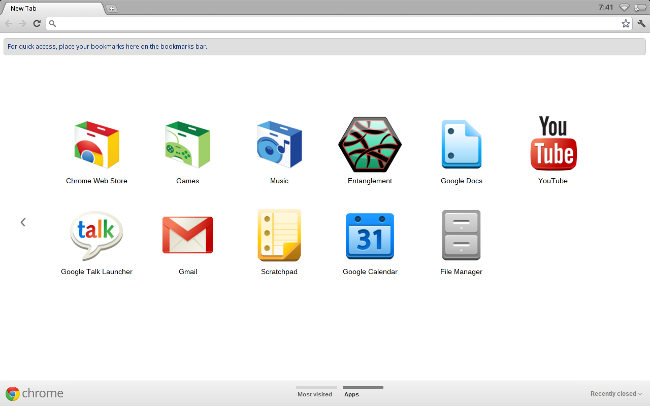
A lot has happened with Chrome OS in the past year. For example, a Chrome OS screenshot one year ago (see figure 1), as apposed to a Chrome OS screenshot today (see figure 2). After actually using a device running solely Chrome OS for close to half-a-year, I have developed a new opinion, and I'm here to share that. I guess this article is an overview of Chrome OS: one year later.

Figure 1
In a short recap of what was said in Gadgetator's first ever article, Chrome OS is basically a computer that only has a web browser. When you first open it up, you get your homepage, opening a new tab brings you to a page that basically contains a grid of glorified bookmarks. To a bunch of web pages. This all sounds great and all, but there's one major disadvantage. You lose all of your native applications. No more Photoshop, Microsoft Word, or iTunes. Everything you do has to be done online. Some might say that's impossible. That this'll never work. On first sight, one year ago, that's what I said. I quote myself saying, "There are great web apps out there, but I believe that for this to be a success, there need to be more great web apps. And until we get some of the most widely used native applications online, Chrome OS will be for the very light computer user."


Figure 2
After using Chrome OS almost exclusively for half-a-year, it's apparent I've changed my mind. You see, I was kind of pushed into using Chrome OS. Google offered its Cr48 to a limited number of beta testers to get feedback for the final product. I was one of those lucky recipients. 

Not wanting to just toss aside something  I received for free, plus taking into account what Google actually intended for me to do with the device, I decided to give it a fair try. I never really went back.

I was already stuck in the Google Universe. I used Gmail, Google Docs, Google Reader, and many other online alternatives to native desktop apps. As soon as I switched to Chrome OS, I found it surprisingly easy to find great online alternatives to any desktop apps that I need. Because I have a "real" computer, I could even print directly from Chrome OS using Cloud Print. Of course, I gave up some conveniences, but I believe that was a fair price to pay for the simplicity I now gained. No complex files, programs messing up your system, virus issues, or any other junk that comes along with a Windows or Mac computer. I couldn't have used this as my only computer, I still use iTunes regularly, but it definitely works a great, simple replacement.
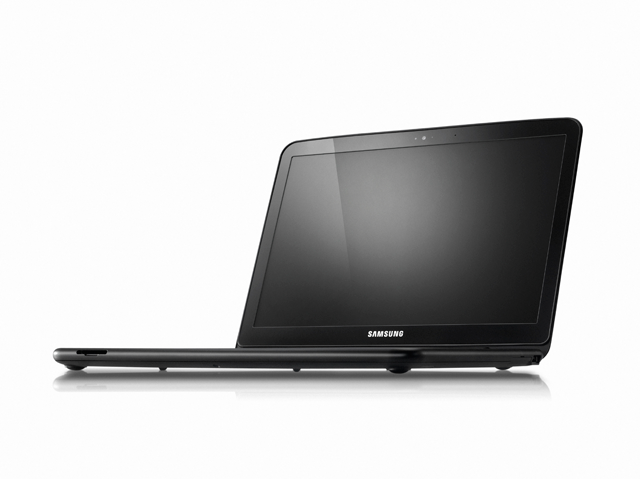
The Samsung Chromebook

Google now licences Chrome OS to manufacturers, who created their own 'Chromebooks'. Currently, both Samsung and Acer have a few models, which run from about $300-$450. At that price, it might be smarter to get a low-end Windows machine, but if you're willing to pay that price for simplicity's sake, it may be worth it. I think that, at this point, Chrome OS and the Chromebooks are great for either simple-computer users who don't want to be confused by the complexities of a "real" operating system, or to be used as a companion to a "real" computer, as Chrome OS has a clean interface, amazing boot time, and easy access to the web.  

Have you played with Chrome OS or the Cr48? Did you take the plunge and buy a Chromebook? What are your experiences with Google's Chrome OS? Like it? Drop a comment below with your experiences.

iPod Nano Watchbands

Sunday, November 20, 2011

Silicone Wrist Strap Watch Band for iPod Nano 6th Purple
The latest version of the iPod Nano, the 6th generation, is a pretty cool and sleek device, but from almost the day it came out, people have been using it as a watch face. The device is the right shape and size, and has a perfect clock feature built in. But you can't use a Nano as a watch without a watchband.

The original Nano watch band was made out of a cheap rubber material, and was more like a wristband than a watchband. Soon, more and more watchbands were being sold, and the iPod Nano watch evolved from a rubber bracelet, to something you'd expect to find on a regular watch.

If you have a 6th generation iPod Nano, and want to use it as a watch, we'll go through the best bands at the best deals.
The HEX Original Watch Band

1. The HEX Original Watch Band

This is the simple, but high quality watch band. Available in nine different colors, there's sure to be one that matches your taste. The HEX features a silicone strap, an easy pop-in, pop-out design, and even has built in button controls. At $29.99, the HEX isn't the cheapest option out there, but it looks cool, functions well, and is an all-around good deal. You can pick one up at shophex.com or at Amazon.

2. The iWatchz Timepiece Leather Watch Band

Timepiece Collection - Light Brown LeatherThe iWatchz Timepiece is a more high end watchband model, and features a beautiful leather band, unlike the HEX, the iWatchz itself doesn't cover the iPod's buttons and use buttons of it's own, rather it uses a "unique patent-pending clip system that uses the iPod Nano's own built-in clip". This makes the watch look a lot more elegant, especially if you have a Nano with a not-so-colorful color. The beautiful design, however, does not come without a price tag, and this band will set you back $89.95. The iWatchz Timepiece is sold at iWatchz.com, or at Amazon.

3. The LunaTik Lynk

Lynk_product2
Probably the most high end watchband out there, the LunaTik Lynk is an extremely elegant watchband that would easily pass for a regular watch. Made of aerospace grade aluminum, this watch band is both sturdy and beautiful. The Lynk is available in silver and blackout, at $129.95 and $139.95 respectively. The beautiful design will match even the nicest, most elaborate clothing. It is not available immediately, but can be picked up for pre-order at LunaTik.com.

In this article, we cover three great watchbands in three different price ranges. However, there are many more great watchbands that may fit your needs better. Before making your purchase decision, please check out the websites of the companies we covered in the article, to view their wide selection of watchbands. The websites are shophex.com, iwatchz.com, and lunatik.com.

Have any other watchbands you've tried and like? Tried any of the bands we covered? Like them? Hate them? Leave a comment below with feedback.

Guest Post: Choosing Home Broadband

Tuesday, November 8, 2011


Getting home broadband can be relatively easy to achieve just as long as you know what sort of deal or package you’re going to need in order to match it to what you like to do online. While there are seemingly a million and one different deals and offers out there in broadband-land, it’s not always that obvious which one is going to be right for your requirements. So, in order to simplify things, all you need to do is remember the following three pointers:

1. Before you sign up to any kind of high-speed internet deal it’s a great idea to do your research. The easiest way to do this is get online and compare and contrast the many different packages that are on the market. Don’t sign up for a deal that is bigger than what you need. So, for example, if you’re happy to do a bit of surfing, check emails and so on, then a smaller ‘lite’ style deal will be more than adequate. People who need to download lots of content, such as movies, meanwhile, should look for the beefier deals out there.

2. Read the small print associated with any of the deals or offers that you like the look of. You may find that the advertising blurb sells the package to you easily, but it’s not until you check the hidden details that you might spot stuff that will ruin the enjoyment of your new home broadband package. Limitations on the amount of data that you can download (and upload) is a common issue with some of the less powerful packages. If you’re going to be online and downloading a lot then this is a key issue to look out for.

3. Finally, explore what is involved in the package that you like the look of. Find out if all of the hardware and software comes included as part of the deal and if anyone will need to come to your house to set things up. If they do, ask if this is included in the price. Also keep an eye out for the sort of technology that is being used in your area, as some internet service providers  have a better infrastructure than others. Asking around your neighborhood, reading real consumer reviews and doing that homework before you sign on the dotted line can pay real dividends in the long run.

So, just as long as you pick through these three suggestions as you explore the available home broadband options in your area, then you will soon be on the right track to getting a high-speed broadband internet supply in your house. Remember that, at the end of the day, you are the customer, and any internet service provider that’s worth signing a contract for should, ideally, do everything they can to help you get set up as quickly and as cost effectively as possible.

Author Bio: Rob Clymo writes for www.broadbandgenie.co.uk and www.mobilephonegenie.co.uk, the online consumer advice portals for broadband, mobile broadband and mobile phones.


Guest Post: Top Smartphones of 2011

Friday, October 28, 2011

Guest post by Chris Pentago. Find Chris on Twitter and Google+.

With every passing year, mobile phones become more advanced. With the current smartphone craze, a newer and more powerful device is always right around the corner. As the year begins to wind down, we take a look at the best new mobile phones available.

Motorola Droid RAZR

Motorola Droid RAZRThe Droid RAZR represents a merging of two of the most iconic brands in the history of mobile phones. Many will recall Motorola's 2004 RAZR, the thinnest phone of its era. The Droid RAZR follows in its footsteps, measuring an incredibly thin 7.1 millimeters.The Droid RAZR runs Android 3.0 Gingerbread and is powered by the latest hardware. It has specs that tech fans drool over. The device features a 4.3 Super AMOLED Advanced display and dual-core processor. The phone also has a front-facing camera for video chat, and can shoot HD video. On top of all of this, Motorola coated the Droid RAZR with Kevlar and a splash guard, making the Droid RAZR resistant to spills.

Samsung Galaxy S2

Samsung Galaxy S2
 The international version of the Galaxy S2 has been available for some time overseas, but it just recently made its way to US carriers. The specs vary between carrier, but the theme remains the same: A massive screen that's around 4.5 inches, a dual-core processor, front and back cameras, and a thin build that's extremely sleek. The phone runs Android 3.0 with Samsung's TouchWiz skin and custom widgets, making the experience of using the device just a bit more friendly for the casual crowd. For anyone who's not on Verizon and can't get the Droid RAZR, the Galaxy S2 is their best bet for a thin phone with a beautiful screen and slim build.

Google and Samsung Galaxy Nexus

Samsung Galaxy NexusGoogle and Samsung have teamed up once more for the latest Nexus device from Google. The Galaxy Nexus sports the features everyone would expect, such as a dual-core processor and front-facing and rear-facing cameras. A few things set it apart from the rest, though. For starters, it has a 4.6" Super AMOLED screen capable of displaying HD video. It has what Google calls a contour display, meaning the screen is slightly curved allowing for easier use. Perhaps most importantly, it is the first device to run what Google calls Ice Cream Sandwich, otherwise known as Android 4.0. Android 4.0 features an overhauled user experience that is faster and sleeker, and requires no physical buttons on the device. Because of this, the Galaxy Nexus is going to be on the cutting edge of both hardware and software.

Apple iPhone 4S


Apple iPhone 4SThe latest iPhone continues to help set the standard when it comes to ease of use, speed and form factor. The device builds on the beautiful design standards established by the iPhone 4 but throws a faster, dual-core processor into the mix along with a much improved camera. The iPhone 4S also includes Apple's proprietary voice recognition software, Siri. Siri lets users operate the device with their voices instead of fingers. Those looking for a reliable and simple smartphone experience can't go wrong with the iPhone 4S.

There are new mobile phones being released constantly. None will last forever before the next great thing comes out, however, these devices are among those with specs that will last for the long haul. All of these devices are available now or will be by the end of November, making them a great pick for the holiday season. Which one would you pick? Tell us in the comments below.

Steve Jobs' Biography is Out

Tuesday, October 25, 2011

So much has happened as far as Steve Jobs news in the past few months. First, the much talked-about news about his resignation as CEO of Apple, and later, unfortunately, the news about his death. Now, although we no longer have the amazing visionary that was Steve Jobs, we do have many of his secrets that he revealed in his official biography, entitled, simply, Steve Jobs.

This 656 page biography, written by biographer Walter Isaacson, opens a window into Steve's mind, as Isaacson conducted over forty interviews with Jobs, up until his death. Issacson also interviewed more than 100 other family members, friends, colleagues, and even adversaries, to try to bring out the entire story.

Walter Issacson is also the author of Einstein: His Life and Universe and Benjamin Franklin: An American Life, so he seems to be an experienced enough biographer for this book.

The book is available on Amazon.com as a Kindle book, in hardcover, and even in CD and Audible.com audio-book versions. It's also available on iBooks, Barnes and Noble Nook, and many other e-Book and paper book retailers.

Guest Post: Caring For your Smartphone

Friday, October 7, 2011

Guest post by Vanessa Burke

When you're ready to make the commitment to your first smartphone, it's a good idea to learn how to care for it properly to make your investment last as long as possible. Smartphones like the Galaxy S2 cell phone, for instance, may be crafted of different material than you're used to which can require a different type of care than a standard phone. 

Many cell phones are housed in traditional metal casings, but some like the Galaxy S2 are made of a more cost-effecient plastic, chosen for its light weight and thin size. Because of this difference in design, these phones require additional measures to keep them free from damage. Here are some tips to help ensure your phone lasts a long time and keeps looking good while you have it. 

Use a case or belt clip to prevent scratches and scuffs. While the material used for cell phones is much more resilient than it may look, it's still a good idea to protect the surface by placing your phone in a case or keeping it secure on your belt. Dropping it in a purse, or carrying it in a pocket along with keys, nail clippers, a knife and other gadgets, can cause unnecessary damage and mar the housing. 

To clean your smartphone, use a soft lint-free cloth like you would use to clean your eyeglasses. Never use household cleaners or harsh cleansers as they can scratch your phone. Instead, spritz some distilled water on your cloth, not directly on the phone, and gently wipe away the dirt. Use a Q-tip to get into the crevices and isopropyl alcohol, if needed, for the keyboard or casing. 

Guard your phone as you would your computer, your iPod, or any other device that can be easily damaged. Tossing it around, frequently dropping it, or abusing it in other ways can shorten the life of your phone and damage it beyond repair. 

Remember the Geico commercial that shows a Humphrey Bogart wannabe who asks the question, "Can switching to Geico really save you 15 percent or more on car insurance?" The actor then asks, "Do people use smartphones to do dumb things?" And of course, since the answer is yes, we see three guys who look like idiots doing just that in a variety of ways. 

While we can laugh at the commercial, there is a lesson to be learned. Be smart about protecting your smartphone. Protect it like you would any other investment you've made. 

iPhone 4S + More

Thursday, October 6, 2011

Apple recently hosted a keynote announcement , announcing its new iPhone, as well as a few minor updates to the iPod line.
Siri on the iPhone 4S

iPhone 4S:


Although some were expecting a completely new and redesigned iPhone 5, Apple will probably wait for 2012 to announce the iPhone 5. Until then, we will have to live with the more minor updates of the new iPhone 4S.

The 4S keeps the same beautiful and elegant design as the iPhone 4, but now comes packed with the same Apple A5 processor found in the iPad 2. This new chip allows for a much snappier experience, along with the ability to carry out more powerful tasks on the iPhone. Although the 4S has a much more powerful processor, battery life is still great, with up to eight hours of talk time on a single charge.

Another major update in the iPhone 4S is the camera. The iPhone 4's camera was always known as a great one, especially for a cell phone camera. The 4S's camera is even greater than its predecessor, with an 8 megapixel sensor, as well as many other improvements to the picture quality. The camera can also now provide 1080p video recording.

The iPhone 4S will also come pre-loaded with Apple's newest mobile operating system, iOS 5. Click here for an overview of iOS 5.

The most talked about feature on the new iPhone 4S is most probably Siri. In April of 2010, Apple bought the voice-command recognition company Siri. Apple is now integrating Siri into it's newest iPhone. To activate Siri, one just holds down the home button on the iPhone, and the Siri window pops up. Users can ask Siri almost anything, and it will answer. It can be used to schedule tasks, play music, dictate emails, look up facts, and much more.

The new iPhone 4S will cost $199 with a two year contract, and will be available on AT&T, Verizon, and now Sprint.

iPods:

The iPod Nano
There really weren't many major updates to the iPod line. The two devices they changed slightly are the iPod Nano, and the iPod Touch.

The Nano has a few new features, including a new, simpler user interface, a built in sensor for exercising right out of the box, and many new clock face options. The Nano's price was lowered to $129 for the 8GB model, and $149 for the 16GB model. The Nano keeps it's same design.

The iPod Touch also got a price decrease, starting now at $199 for 8GB, and is now available in white.

Steve Jobs: 1955-2011

Wednesday, October 5, 2011

Steve Jobs, former CEO and founder of Apple Inc., has passed away earlier today. Steve was the spark of the success of Apple, and the one who changed the technology industry for all of us. Rest in peace, Steve Jobs.

Read about Steve on Wikipedia, and hear what president Barack Obama said about the great visionary.

Amazon Updates the Kindle Lineup

Wednesday, September 28, 2011

In a recent press event, Amazon, the makers of the popular Kindle e-reading device, announced the next generation of Kindle devices.

Kindle:

The good old Kindle we all know and love, right? Wrong. Although it keeps the simple, one word name, the new Kindle is a very different looking device. With the same 6 inch screen size as its predecessor, the new Kindle weighs 30% lighter (6 ounces), most likely due to the most noticeable difference: the new Kindle has no keyboard. Instead of using the keyboard, one navigates the device using the new five way controller, as well as four other small buttons.

The New Kindle
Download books over Wi-Fi (no 3G option this time around), and read them wherever you go, with up to a month of battery life on a single charge. Also, as Amazon is marketing strongly, the Kindle can be used even in bright sunlight, because of its black and white e-ink display.

The most compelling aspect of the new Kindle is it's price. The new device is the cheapest Kindle ever, at $79 if you choose "special offers" (click here to get an overview of what special offers is). If you choose not to go for the special offers, you'll pay $109 for this new e-reader.


Kindle Touch:

The Kindle Touch
At first glance, the Kindle Touch looks almost identical to the Kindle. The main noticeable difference is the Touch's lack of buttons. However, no buttons are needed, due to the Kindle Touch's 6 inch, e-ink, thouchscreen display.

Other than the touchscreen display, the Kindle Touch is almost identical to the regular Kindle. Another big difference is the 3G capabilities. The Touch is the only new Kindle that is available with a 3G model. With the always connected convenience of a cell phone, without any monthly fees or yearly contracts. The Wi-Fi version costs only $99, while 3G capabilities will cost you $149.


Kindle Fire:


The Kindle Fire
Probably the most anticipated update to the Kindle family is a color tablet device, called the Kindle Fire. The fire comes packed with a 7 inch color screen (something completely new to the Kindle brand), a 14.6 ounce weight (about the weight of a can of beans), a dual-core processor, and 8GB of storage. The body of the device is simplistic yet pretty, with no visible buttons.

The Fire runs Android, with an Amazon skin that makes it look like a completely new OS. Amazon is marketing the Fire as more of a multimedia player than a tablet computer, and, since it doesn't run the Android Market, that's really what it is. You can, however, download apps from the Amazon Appstore, which has, as Amazon says, "thousands of apps and games". You can download this content via the built in Wi-Fi, as this device has no 3G built in.

The Fire seems to revolve almost solely on Amazon's content. You download music from the Amazon MP3 store, apps from Amazon's Appstore, and movies from it's own video store. As always, books are also downloaded from Amazon's own service. This is an Apple-like strategy (with Apple's iTunes store), and is probably one of the reasons that Amazon can sell this device for only $199.

The new Kindle Fire is available for pre-order now, and will ship on November 15.


Search This Blog

Subscribe to Gadgetator by eMail

Most Popular

About the Author

Elazar Krausz founded Gadgetator in December 2010, and has been writing there ever since. To find out more, click below.
Online Marketing
Add blog to our blog directory.