Showing posts with label apple. Show all posts

Apple Unveils iCloud, iOS 5, Shows off Mac OSX Lion

Tuesday, June 7, 2011

It's that time of year again! Apple holds a developer's conference every year in San Francisco called WWDC (Worldwide Developers Conference, discussing, usually from more of an app developer's point of view, some of the new products or services that Apple is creating. This year's event was sold out in less than ten hours, and tickets weren't cheap either, so we'll see what they paid to see.


Steve Jobs, Apple's CEO (Currently on medical leave), with the help of some fellow Apple employees, announced three new products/services, and showed off one more, that had already been announced. None of these three products are actual physical products, but they are just as interesting.

Apple's iCloud logo
iCloud: The first product announced is called iCloud, and is an online service similar to the current, and slowly phasing  out, Apple service Mobile Me. iCloud is an online service that stores and syncs "your music, photos, apps, documents, and more", as written on the Apple website. The service then syncs all of that data with any other internet-connected Apple device. iCloud will also work on a Windows 7 or Windows Vista device will iTunes. Best of all, it's all free, for up to 5GB of storage.

iCloud will store any music bought via the iTunes Store, but you will also be able to store music you got any other way, be it a ripped CD or the Amazon MP3 store, for $24.99 a year. iCloud does this by scanning the song and matching it with an existing song in it's library of over 18 million songs. iCloud now knows you have the "rights" to the song, and will stream it at your command. This won't work for any song not in the library of 18 Million, so if you have music you created yourself, or an unpublished remix of an existing track, this won't work. One of the major benefits of this service, though, is the fact that if you have a song saved as a very low quality track, iCloud will play it back as the 256Kbps quality that iTunes currently offers.

iCloud in Action
iCloud also will take any picture you take with your iPhone, upload it to the cloud, and sync it with any of your other devices. The service lets you see your already purchased apps, and allows you to download an app again, for free on up to five devices. iBooks will also be synced between devices, as well as any documents created with iWorks, which apple just released the iPhone version of.

Another really important feature, iCloud backs up all of the data on your iPhone or iPod touch over the air, so there is no need to connect your device to a computer.

iCloud will be available for free this fall, along with iOS 5, which will be discussed later in the post.

Mac OSX Lion: After discussing iCloud, Jobs handed over the presentation to Phil Schiller, Apple's senior vice president of worldwide product marketing, who talked a little bit about the latest edition of Mac OSX, called Lion.

Mac OSX Lion will be available as a 4GB download from the Mac App-Store, and will cost $29.99. Most of the new features in Lion, at least the ones that Apple showed off, were already talked about, and you can read my post about those here.

iOS 5: The last service talked about at today's keynote was iOS 5. iOS, Apples mobile operating system that's used on the iPhone and iPod touch, is updated every so often, but a major release, like iOS 5, is released only around once a year.


iOS 5 will be available in July as a free update for your iPod touch or iPhone, and will many new features. One of those is the "Notification Center".

The notification center is accessed by simply swiping down on the screen. This will show a list of notifications, including email, text messages, and notifications from other apps on your phone. Notifications will also no longer interrupt everything you are doing, rather they will just slide in above the app you are currently using, and disappear quickly. Notifications are also accessible from the lock screen, and you can easily respond to a notification from the lock screen.

Revamped Notifications for iOS 5


iMessage will replace the SMS app for the iPhone, and will also be available on the iPod touch. iMessage allows users to send text messages via their 3G data provider, or they can send free text messages over a data connection to anyone else with an Apple iOS device. Messages can also include pictures, sound, and video.

iMessage for iPad, iPhone, and iPod touch


Newsstand, one of the new additions in iOS 5, is the iBooks for magazines. Newsstand differs from all other apps, because instead of opening up like a normal app, it opens as a regular folder currently in iOS would. The folder differs from a regular folder, as it contains digital magazines, instead of apps. The background in the Newsstand folder looks like the wooden bookshelf currently found in the iBooks app.
Newsstand, a folder of magazines

Reminders is a new app that will be found in iOS 5. Reminders allows one to set reminders for himself, and organize reminders in to do lists. Reminders syncs with iCloud, Outlook, and iCal, so your to do's will be everywhere.
Reminders for iOS 5


Although Twitter already has an iOS app, with iOS 5, it will be integrated as an app that comes with the device, similar to what Apple is doing already with YouTube. Twitter will now be integrated into many of the apps Apple already has on their devices, such as Safari, Photos, Camera, YouTube, and Maps. One will be able to tweet directly from any of those apps.
Twitter, integrated into iOS 5

The camera is now accessible from the lock screen, so if you ever have a photo you really need to capture, and fast, your iDevice will help you. The camera button on the lock screen even bypasses any passwords set on the device, so your camera will be ready when you need it. The camera also has a new grid that you can use for better alignment while taking a photo.
The camera app, accessible from the lock screen

The Photos app will also be improved, with new photo editing features such as crop, rotate, enhance, and remove red-eye. The camera app also allows you to organize the photos in albums right on your iDevice. Of course, with iCloud, your photos will be synced to all of your other Apple devices.
The new photos app, now with editing

Safari, Apple's built in web browser, is also improved with new tabbed web browsing, a reader function that strips out all of the junk from a website, and just shows you the content you want to see, as well as a reading list that allows you to save articles for reading later. Procrastination at it's finest.
Safari with tabbed browsing

With iOS 5, any iDevice is completely PC free, no computer is needed to set up the device, or to put on music movies, or anything else. The new iCloud service takes care of backup, so you can easily restore a device wirelessly.

Some of the smaller improvements include some new features for the Mail and Calendar apps, an update to GameCenter, Apple's gaming social network, which allows users to set a profile picture, WiFi sync, which allows you to sync music, podcasts, and videos wirelessly with your computer over a WiFi connection. Apple also added multitouch gestures to the iPad, which allow you to swipe through apps by swiping your fingers across the screen, etc. The iPad 2, with the iOS 5 update, will be able to mirror the image you are seeing on it's screen wirelessly, instead of using the HDMI cable currently available.

I myself got extremely excited when writing this post, because this update to iOS 5, along with iCloud, really takes care of many of the problems people had with iOS devices. The only negative is that iOS 5 and iCloud will only be available in the fall, so we've got a while to wait.

The reason that Apple announced these products so early is because they need developers to write apps for these platforms, which takes a while. Apple developers have access to Lion, iCloud, and iOS 5 now, and can start developing for those platforms. If these new products really have you salivating, you could shell out the $100 is costs to become an Apple developer, but you have to own a Mac computer.

Apple Releases iWork to the iPhone

Tuesday, May 31, 2011

Students and business-people alike both need, on occasion, to type up a paper really quick, or to create a quick presentation for their meetings the next day. Up until now, if all you had on you was an iPhone or iPod touch, you were mostly out of luck. Using some free or paid apps, you could type up a few sentences, but adding formatting or pictures was really just not possible. Until now.

In a press release earlier this morning, Apple, the makers of the iPhone and iPod touch, announced three new apps for the iPhone, all of which are branded as part of the "iWork Suite". These three apps are Pages, which allows for some heavy word-processing power, Keynote, which allows you to create slick looking presentations, and Numbers, Apple's spreadsheet-creating app.

All three of these apps were first available on the Macintosh, then later came to the iPad, and now have finally arrived on the iPhone and iPod touch. Each app is available in the iTunes App Store, and will cost you $9.99 a piece, which, although it seems kind of pricey, could be worth it. For current owners of the iWork apps on the iPad, the iPhone version is a free upgrade.

Although this seems kind of cool and very useful, creating presentations or spreadsheets on such a small screen is a slightly daunting task. Also, the iPad versions of these apps have not been such a smashing success,  which could be a bad sign for this new version. 

Overall, these apps are a little pricey, but when you need them, you really do need them. If you have to create quick documents or presentations on the fly, then go ahead and shell out the $10 for the app. However, if you don't really need it, but you thing it would be cool to have, you probably should save your money for a better cause.

White iPhone 4 Finally out; Thicker? (UPDATE: Apple Responds)

Thursday, April 28, 2011

     It has been nearly a year since Apple announced it's latest edition of it's smartphone device, the iPhone 4. Like every edition of the iPhone before this one, it was going to be available in both black or white colors. The white edition of the iPhone 4 was delayed for a few weeks, and then completely taken down from the Apple website.
     Rumors have been floating around pretty much ever since the white iPhone was delayed. There were both rumors about why it was delayed, and about when it would come out. Although we may never know the answer to why the white iPhone 4 was delayed for so long, we do know when it will come out. The answer: today.
     Apple posted a picture of the white iPhone 4 on it's website yesterday, along with a caption saying that the white iPhone 4 will be available tomorrow. That tomorrow is now today.
     The white iPhone 4 is available for purchase now, and many have already bought it. The ones who already have the device in their possession have started a buzz about the thickness of the white iPhone 4 compared to the black version.
     The picture below shows the slight difference in the thickness of the white iPhone compared to the black Model.
     Speculation is always possible as to what the reason for the thicker device is. However, I believe that this difference in thickness means next to nothing, and time should not be wasted guessing the reason for the thickness difference. One of the reasons that the white iPhone may be important, is that Apple wouldn't a new model of the same version phone if a newer version phone was just a few months away. This white iPhone launch seems to support the rumors that the iPhone 5 will not be coming out, as originally expected, in June 2011.

UPDATE: Apple responded to this claim by saying that, unlike what the picture above suggests, the white and black iPhone are actually the same size. Consumer Reports also did testing on this issue, and concluded that both models of the iPhone are the same thickness.


Apple brings iAds to the iPad

Tuesday, March 15, 2011

iAds on iPad
     iAds is Apple's advertising service for mobile apps on the iOS platform. iAds allows ad creators to add videos, music, and even small interactive games to their ads. The iAd platform has been available on the iPhone and iPod Touch for a while, and the first iAd appeared on the iPad today.
     The first iAds advertisement on the iPad is an advertisement for Dove Men+Care. The maker of Dive Men+Care, a company called Unilever, put out the ad, which contains a basketball jumbo-screen with videos and interactive NCAA-themed trivia questions.
     iAds on the iPad is a good thing for both Apple and ad creators because it brings the interactive advertisement to a larger screen. This would be a great place for movie trailers, and other things that just look better on a larger screen.
  
Source: CNET

New iPad 2 Owners Reporting Problem in the Display

Sunday, March 13, 2011

     iPad 2 went on sale a few days ago in Apple stores around the United States, but people are already seeing problems. Some new iPad 2 owners are saying in the MacRumors forums that they have been seeing yellow spots beneath the screen's glass in one or two corners of the iPad's screen.
Yellow Tinge on iPad 2
     The iPhone 4 saw the same problem at it's launch. Apple said that the problem was temporary, and that it was just caused by the fact that the glue in the display didn't have time to evaporate yet. Apple rushed the iPad 2 because they wanted to get them in stores as early as possible, so the problem is temporary, and should go away shortly.
Light Leaking through the Edge
     Another problem people were seeing with the iPad 2 was that light was leaking through the outer edge of the iPad, and making a lighter spot on the LCD. The leaking light is more noticeable when the screen is dark, but still on. For example, a dark scene in a movie, or a app with a black background.
     The first problem with the yellow spots is definitely temporary. The light leaking through doesn't seem like a temporary issue, but it could possibly be linked with the first issue. It you have a light leaker, wait a few days and see if anything happens, and then, if it's still an issue, take it to the Apple store and see what they can do about it.

iOS 4.3 Brings Lower Credit Card Bills

Friday, March 11, 2011

     Along with the iPad 2, Apple announced iOS 4.3. Steve Jobs, Apple's CEO, had said that 4.3 would be available on the same day as the iPad launch, March 11, but it came unexpectedly a few days before. I immediately downloaded 4.3 for my iPod Touch, and really, I didn't see much difference. Apparently parents with kids who spend thousands of dollars on in-app purchases will.
     There was a recent request for investigation of Apple from the FTC due to the fact that kids were charging their parents credit cards hundreds of dollars buying FarmVille cash, or really any other in-app purchase.

     There is a 15 minute time period before you have to enter your password again for buying anything through Apple ID. Without that period, it would be extremely annoying to have to enter your password six times when buying six songs or TV shows, but apps with in-app purchases have been taking advantage of that by offering in-app purchases soon into the launch of the app, hoping that kids will go for it, and not have to enter their parent's password.
     With iOS 4.3, a separate period of time can be set for in-app purchases. This means that you still will be able  to buy movies or songs within that 15 minute period, but in-app purchases would need a password.
     This mostly seems like Apple trying to get out of any FTC investigations, but it should make parents happy. Until they see that their kid spent $50 on Weird Al Yankovic music videos.

iPad 2 Announced

Wednesday, March 2, 2011

     The original iPad was, like Apple said, a magical and revolutionary device. It was the first majorly successful tablet PC, and started the 2011 "Tablet Rush".
     At an event earlier today, Apple's CEO Steve Jobs announced the next generation of the iPad: the iPad 2. Steve Jobs was, or maybe still is, on medical leave. There had been reports that he had only six weeks to live, and pictures of him walking out of treatment very thin, so everybody was relieved when he walked on stage, looking just like he did a year ago.
     The iPad 2 is thinner, lighter, and has a faster processor than it's predecessor. It comes in WiFi only and 3G models, both of which are 9.50 inches high, and 7.31 inches wide. They are also both only 0.34 inches thick, making it easier to hold than the original iPad. Also, the WiFi version weighs 1.33 pounds, with a the 3G  version weighing in at 0.1 pound heavier. Both the WiFi and 3G models come in 16, 32, and 64 gigabyte versions.
     Both the WiFi and 3G versions come with Bluetooth, making it good for wireless keyboards. The 3G version is available on both the AT&T and Verizon wireless carriers.
The iPad's 9.7 inch glossy capacitive touchscreen makes playing with the iPad a beautiful experience. There was some speculating about the iPad 2 bringing a better screen resolution, but it stays at the same 1024 by 768 resolution.
     The iPad 2 comes to the market as the first shipped dual-core tablet with Apple's new A5 processor. This 1GHz custom designed chip gives high performance without draining battery life. Another improvement is in the graphics, which Steve Jobs says are now up to 9 times faster.
Steve Jobs at iPad 2 Event
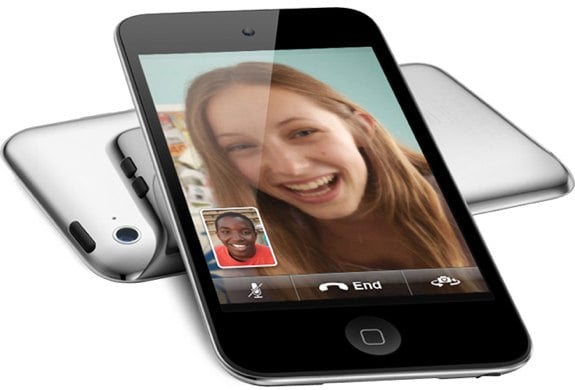
     It also has the expected front and rear facing cameras. The rear facing camera is capable of taking 720p video at 30 frames per second, while the front facing, VGA camera can also do 30 frames per second video. These cameras are great for the iPad's new integrated FaceTime app. FaceTime allows you to videochat with other iPad owners. It also has compatibly for the iPhone, iPod Touch, and Macs, so you can videochat with anyone in the Apple Universe.
     Despite the added features and slightly smaller body, the iPad 2 claims the same 10 hour battery life on WiFi as the original iPad, using 3G, the battery life should be about an hour less, at 9 hours.
     The iPad 2 also brings the gyroscope of the iPhone and iPod Touch to the iPad experience, which will greatly enhance the gaming experience on the iPad.
iPad 2 with FaceTime
     Some other new features include the ability to completely mirror the iPad's screen onto an HDTV via the $39 HDMI connector, the choice now of black or white, and a new kind of case.
     Last iPad, Apple did it's own case. The case was simple but efficient. Apple wanted to do another case this time, but one that wouldn't take away from the sleek design of the iPad, and also wouldn't add too much weight. They came up with the iPad Smart Cover.
            Smart Cover Closed
     The smart cover was designed long with the iPad 2, making it work extremely well with he device. The Smart Cover is a screen cover that attaches with magnets. There are magnets inside the iPad and on the cover, so it's easy to put on, and it also auto-aligns. The cover is made out of 5 flat attached by either Polyurethane or leather. It can be lifted up and folded to use as a stand for typing, or a stand for watching movies. The iPad also automatically wakes up when the cover is raised, and locks when it is placed back on. As an added bonus, the side of the cover touching the iPad screen is made of microfiber material, so the screen is cleaned anytime you open or close the device.
     A big thing Apple focused on in then announcement was the software. iPad 2 will run iOS 4.3 which brings some new features with it. 4.3 brings new AirPlay enhancements. AirPlay allows users to stream content from their iOS devices to an Apple TV or other compatible device. The update allows AirPlay from the Photos app, and makes streaming a lot easier, as it will scan your network for an Apple TV, so you don't have to set up anything.
     4.3 also brings Apples Nitro JavaScript engine to the iPad's Safari app, making web pages load a lot faster, especially ones with a lot of interactive JavaScript.
     Another cool feature in iOS 4.3 is iTunes Home Sharing. Home Sharing allows you to stream your entire library to your device over a shared WiFi connection. This seems like a cool feature, but if you ever have to leave your house, your content won't come with you.
     Apple also introduced two new apps, both available for $4.99 in the app store. These apps are iMovie and Garage Band. iMovie allows users to do complex movie editing, and offers cool themes. Garage band allows users to create and edit music, even without any musical talent.
     The iPad 2 brings many new features to a thinner, lighter package, and keeps the $499 price tag of the original iPad. Available on March 11th, the iPad 2 seems like a good buy for anyone who wants to spend $499 on a new device.


Mac OS X Lion: Available to Developers

Thursday, February 24, 2011

     Quite a while ago, Steve Jobs, the CEO of Apple at that time, held a keynote titled "Back to the Mac" At that same keynote, he gave us a sneak preview of the next generation of Mac OS X, called Mac OS X Lion.
     Although Mac OS X Lion is still a while away, software developers signed up for Apple's Developer Program got an early look. OS X Lion is coming sometime in summer 2011, so the version of the operating system the developer's go is still in it's early stages. Still, what the developer's saw had some cool features.
     This new version of OS X brings the best features of the iPad onto the big screen size and more powerful specs of the macs.
     Apple integrates the elegant home screen of the iPad onto the Mac, and allows you to click the little black Launchpad icon on the dock a the bottom of the screen. Any open Windows fade away, and an iPad like grid of icons appear. This is where you can find all of your apps. The apps can be dragged into folders, which look and open just like the folders on the iPad and iPhone.
     Apple also apparently likes how all iPad and iPhone apps open full-screen. The new iPhoto, Mail, iCal, and Preview apps all can open full-screen. This allows you to concentrate on one thing at a time, or so Apple says. The apps can be changed to full-screen with one click, and open apps can be swiped through with multitouch gestures on the trackpad. The Developer platform also allows third-party apps to take advantage of the full-screen capabilities.
Launchpad
     A new and funnily named feature in Mac OS X is Mission Control. Mission control allows you to see everything that's running on your Mac, from a birds eye kind of view. It shows little icons of running apps, the dashboard, and the desktop.
    OS X Lion also integrates a new auto-save feature. This automatically saves your work, and allows you to revert back to previous versions of a document. Similarly, you can see all previous versions of a document in the order that you edited it.
     The new version of he OS also allows you to resume exactly where you left off when you restart your Mac. There is no more need to save and close everything, and then restart it all when you turn on your computer again.
     A few new features come in the new Mail app, Mail 5. Mail now supports conversations, which groups a conversation of emails in one group, rather than showing ten emails separately. The layout of the app is also redesigned for the Mac's widescreen. It shows the one line preview on the left side of the screen, as well as a full height preview at the right.
Mission Control
     The last main feature is called AirDrop. AirDrop allows you to share files with others wirelessly. To use AirDrop, you click the icon in the Finder, and you then see any Macs around you also using AirDrop. If they are in your contacts, you can even see their profile picture. To share a file, just drag a file to the other users profile. They can then accept the file, and it will start to download.
     Overall, this seems like a very exciting update to the Mac operating system. The fact that Apple is bringing it's Macs closer to the iPad scares some. The iPad is a very closed platform. Any apps must be approved by Apple to be included in the App Store. With the recent launch of the Mac App Store, it seems that the Mac platform is getting less and less open, giving Apple more control. The end user thinks that the closed platform of the iPad is great, but overall it gives more control to Apple, which isn't necessarily a good thing.

Game On! Which Mobile Gaming Device is Right for You?

Sunday, February 20, 2011

      When you look through the store for a new mobile gaming device, you may see a few options. How do you know which one is the one you should be taking home?
      The two main players in the mobile gaming market are Sony, with it's Playstation Portable, and Nintendo, with it's DS. Both companies have announced a new model of their device which are not out currently. Nintendo's new model will be available March 27, 2011, while Sony's new device's release date is yet to be announced.

NINTENDO DS

      Nintendo's DS is geared towards more casual gamers. Pokemon, Mario, and Zelda work great with this device. There is a Call of Duty game on the DS, but the graphics aren't great, and there aren't many games like it on the DS.
      The DS uses two screens one on each half of the device. The device folds like a typical clamshell laptop. The top screen is usually where most of the action in a game happens, while the bottom screen, a capacitive touchscreen, is where additional data or controls usually go. On the two sides of the bottom screen are the  A,B,X, and Y buttons, while the other side houses the up, down, right, and left buttons.
      The DS is now in it's 4th generation, with the 5th, the 3DS, coming late March. The current model, the DSi XL, measures in at a pretty big 4.2 inches tall, and 6.34 inches across, and weighs about twelve onces.
      At a newly lowered price of $169.99 you get, along with the obvious ability of playing games, a front and rear facing camera (although no videochat), as well as some cool effects to add to your photos. The DSi XL includes a microphone, which, along with being useful for blowing up balloons in Mario Cart, can also be used to record sound clips, which can later be edited on the DS.
     The DS's online features allow for one to download games and add on's from the DSi Ware store. The device also includes a web browser.
     If you want all of the features of the DSi XL, but don't like the big size, the $149.99 DSi is fine.
     The game selection on the DS is pretty big, but is focused on casual games. Nintendo brings some exclusive games to the DS, like Mario and Pokemon.
     The next generation of the DS, the 3DS, is probably worth waiting until late March for. It's the first mobile gaming device with 3D capability. Read my review here for more info.

SONY PLAYSTATION PORTABLE

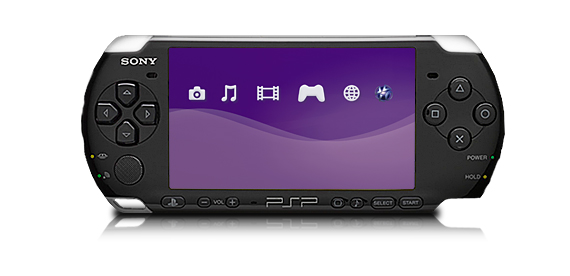
PSP 3000
     Sony's Playstation Portable, or PSP, is the device for more serious gamers. You'll get great graphics for games like Call of Duty, but casual games are harder to find. 
     The PSP is available in two models, the PSP 3000, and the PSP Go. The 3000 is a device about 6.7 inches across, and 2.7 inches tall. At 6.7 grams, the PSP 3000 is almost half the weight of the DSi XL, making it much more portable. 
     The PSP 3000 uses small CD-like disks for games and movies, but also has support for storing content on a memory card. 
     The front of the PSP 3000 houses the 4.3 inch screen, as well as the legendary Playstation buttons. On the other side of the screen is the up, down, left, and right buttons. A mini joystick can be found right under the directional buttons.
     With the PSP's built in WiFi, you can surf the net, download RSS podcasts, and even download and read comics. The PSP also allows you to remotely play games on your Plastation 3 (a device you hook up to the TV) that's at home.
PSP Go
     The PSP 3000 directly competes with the DSi XL with the MSRP of $169.99. For the same price as the DSi XL, you get more intense graphic capabilities, a built in microphone, a big 4.3 inch screen, and even the ability to make calls using Skype. 
     The PSP Go is almost identical in features to the PSP 3000, the main difference is the fact that you have to download games onto the device, as there is no disk drive. The Go also sports a slide out piece that houses the controls.
     Sony recently announced a new model of the PSP, known as the PSP2. This device sports a touchscreen and some more new features, but no pricing or release date information is available yet.

SURPRISE, THE IPOD TOUCH

     Although most don't think of an iPod as a gaming device, the iPod Touch is close to outselling both the DS and the PSP. The iPod Touch is surprisingly good with games, but almost all of the games on the Touch are aimed at very casual games. 
     The iPod Touch is not only a gaming deice, and also allows you to install other apps to do things like read books, book airline tickets, and manage your calander. 
     See my review of the entire line of iPods for more details on the Touch here.

     Overall, the iPod Touch is great for the very casual gamer who also wants to listen to music, watch movies, and even be productive on their gaming device. For the gamer who wants a device mostly devoted to gaming, but still focusing on more casual games, the DS is a great device. The more extreme gamer should go with the PSP. While he PSP has the ability to play movies and other content, it's much better at gaming, and you'll probably find that that's all you're doing with it.

The Daily iPad Newspaper Anounced

Wednesday, February 2, 2011

     The iPad has become increasingly popular, especially with news apps. When I looked in the Apple app store today, there were over 400 apps specifically designed for the iPad. That's a lot of stuff to read, and Rupert Murdoch wants to give iPad users the best.
     Today, at an event in the Guggenheim Museum in New York, Murdoch, along with Jon Miller, Jesse Angelo, and Greg Clayman, announced a new, daily newspaper for th iPad called The Daily. The Daily is a newspaper that completely rethinks news consumption for the iPad. The Daily takes the average newspaper or magazine, digitizes it, and adds a lot of multimedia affects.
Carousel on The Daily
     The Daily can be flipped through like a regular magazine. You can also browse articles with what The Daily calls "the carousel". This shows the front page of all of the articles in a carousel like way. Those familiar with the Apple MP3 players will recognize this as a kind of Cover Flow idea. You can then tap on an article, and it will be enlarged to full size and allows you to read through the article.
       You can also browse by category. The Daily is divided into six topics. These topics are News, Gossip, Opinion, Arts and Life, Apps and Games, and Sports.
       News includes the regular stuff, international news, important stories. Some stories include video or even 360 degree images. The weather section brings you completely away from a traditional magazine, and looks more like an app. It brings you very in depth reviews of the weather, while giving you the ability to tap on different icons for different things.
     Gossip has celebrity news and things like that. In the first issue, which they showed off at todays event, there was an article about two celebrities and their Twitter feeds. Using the special software that The Daily developed, the Twitter feeds were shown just under their picture.
     Apps and Games was a section The Daily did because they knew that their audience was one that owned iPads, and therefore many of them were interested in the app thing. Apps and Games has app reviews, along with photos, and a direct link into the App Store if one decides to download the app. Like a traditional newspaper, it includes daily crossword puzzles and Sudoku, which, unlike a traditional newspaper, can track your time and scores, and even let you play against others.
Weather on The Daily
Sports on The Daily
    The sports section offers a very unique experience and customization abilities. Since The Daily is a national newspaper, it needs some sort of way to customize it. You can choose the teams you want to read about, you can also see live scores, stats, and more.
    The Daily seems really great, but how much would you pay for it? Five dollars an issue? 1 dollar an issue? The Daily will be available for... 14 cents an issue! At 99 cents a week, The Daily gives you great value for your money.
    The Daily said at the event that it would eventually come to all major tablets, but the few two or three years are Apple's. The Daily also said that right now most of the revenue would be based on subscriptions, but they would like to eventually be 50% advertisement revenue and 5o% subscriptions.
    You can find The Daily on the App Store, on Facebook, and on Twitter.
    The Daily is free for the first two weeks, so if you own an iPad, you should definitely check it out. If you have an iPad and tried it out, please leave a comment telling us what you like or don't like about it.

Watch the Video Below for More Info. To watch the entire The Daily announcement click here.

Apple Pulling other eReader Apps? (Update: Apple Responds)

Tuesday, February 1, 2011

Gadgetator's trying a new format for the not so tech savvy readers. At the beginning of each post, we will be writing a list of tech jargon and their definitions that one would need to know at the beginning of the article. Like this idea? Hate it? Please leave a comment with your feedback. Thank you.

eReader-An eReader is a device that allows you to read digital books instead of paper ones.

     Sony makes an eReader called the Sony Reader. As with many eReaders, Sony designed an iPhone app that allowed one to read the eBooks that they downloaded from Sony on their iPhone. This app was rejected by Apple for some unknown reason. 
     Apps are rejected all the time by Apple, but it's always because of a violation of one of Apple's rules. So far the Kindle, the Nook, and many more eReaders have apps on the iPhone that weren't rejected. This could simply be because the Sony app had some problem with the code that went against Apple's rules. It could also be that Apple has changed it's policy and is now not allowing third party eReader apps.
     Apple also has an eReader app called iBooks, which is the reason why one would think that Apple is rejecting other, third party eReader apps, and even may start to pull the old ones.
     According to the New York Times, Apple is changing their policies to no longer allow third party apps to sell content, like eBooks, inside their apps. Now, if you're worrying about games like Farmville, which allows you to buy coins from inside the app for the game, that's nothing to worry about, this does not stop app developers to sell through their apps, rather just requires them to use Apple as an intermediary. 
     The story seems true, as Sony spokesperson Steve Harber is quoted, "“It’s the opposite of what we wanted to bring to the market, we always wanted to bring the content to as many devices as possible, not one device to one store.”
     So what does this mean for other eReader apps? Although the other apps don't have an integrated bookstore, they do allow users to download already purchased content from other devices, something which, according to the New York Times, Apple said was against the rules. This would affect Amazon with it's Kindle and many other popular eBook apps. 
     For now, we'll just have to see what happens. The story seems very believable, and neither Apple, Sony, or Amazon would comment.


UPDATE: Apple responded saying that they had not changed any developer guidelines, but wants a cut of anything sold through their devices.

Apple Mac App Store

Sunday, December 26, 2010

     Over the past few years the idea of apps became very popular. You can now get iPhone apps from the iOS App Store, or Android apps from the Android Market (although you have to download them from your phone), you can even get apps for your Windows netbook with Intel's AppUp.
Mac App Store Running on a MacBook Air
     Apple, who kind of started the the app thing with it's iPhone and iPod Touch, is doing it again with a app store for the Mac. According to the Apple website, the Mac app store will be available for download on January 6th. It seems almost exactly like the iTunes app store for iOS, but the apps here are a lot more expensive.
     It seems that almost all of the Mac programs you can buy on the shelf at a computer store will be available for  download here. Some programs include iPhoto, GarageBand, Color Studio, and Home Watch.
     A similar program to the Mac App store exists already, called Bodega. Bodega can probably do almost everything the Mac app store can do, but must have a smaller selection.
Bodega 
     So what will the Mac app store give me that something like Bodega won't, and what benefit do I have by using this rather than going to the store and taking the software off the shelf? Why would I want to use the Mac app store?
Mac App Store Logo
     Firstly, coming from Apple, it will be a clean interface, a lot easier than surfing around the web for a download that might not even be there. Also, it will be a great place to find reviews, both good and bad, for the software.
    It seems good so far, but there a few reasons why you may want to stay away. If you have a slow internet connection, this is a bad idea. You don't want to spend hours waiting for a 1GB program to download. Also, Apple will probably have the same approval process here as they do in iOS. Apps may get pulled, and you might not be able to find the apps you want.
    So is this a good thing? For most, yes. But some may find themselves going back to the brick and mortar shops, and pulling that same old software off of those great metal shelves.

_______________________________________________________________________________________________

Want Gadgetator to write about a topic of your choice? Just leave a comment with a suggestion for a new post.


Choosing an iPod

Sunday, December 19, 2010

     Looking for an MP3 player? Trying to find what you need at the best value? So you looked at user reviews of the MP3 players out there. And you decide you'll go with an apple device. Now what?
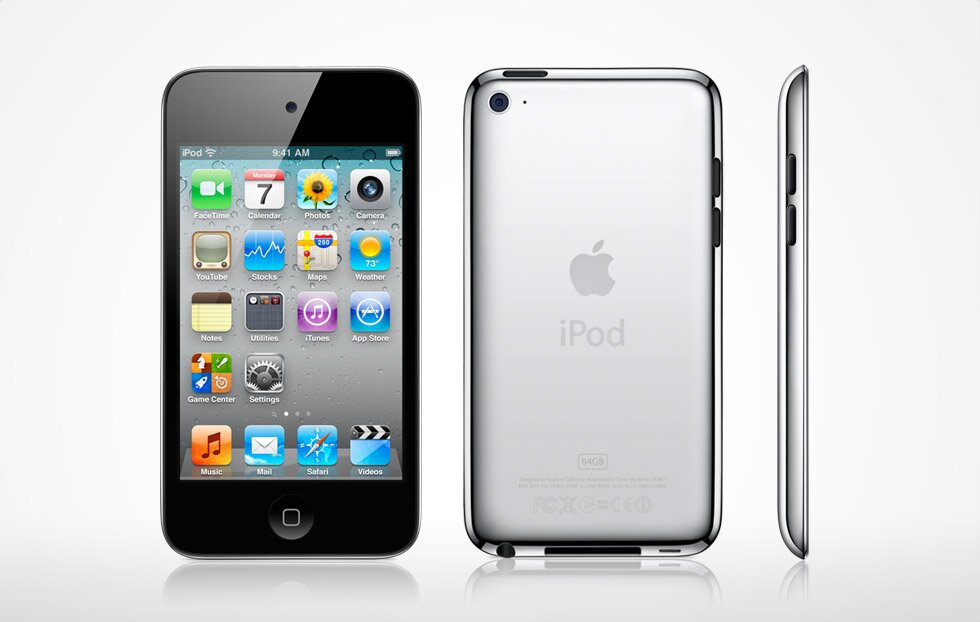
    Apple makes 4 iPod devices. The iPod Classic, iPod Nano, iPod Shuffle, and the iPod Touch.
iPod Classic
    The iPod Classic will set you back $249, but gives you 160GB of storage. It does music, videos, and podcasts, along with games. It also includes a clock and some other basic features.
iPod Nano
    The Nano costs $149 for 8GB, or you can double the storage for an added $30. It, unlike its predecessor, only does music, podcasts, and radio (a feature not available on any other models). Its small touchscreen display  might be a little too small for one's fingers. For video recording and playback, you might want to check out the earlier edition (5th generation), but get it while you can.
iPod Shuffle
     The Shuffle is available at an inexpensive $45. For that you get 2GB of storage. The Shuffle was once available in 4GB, but it seems that currently only a 2GB version is available. The Shuffle can only do music and audio podcasts. It has no screen, so you have to organize your music in the right order on iTunes.
iPod Touch
     The iPod Touch is my recommendation. It is available in 8GB, 32GB, and 64GB, at prices of $229, $299, and $399, respectively. For only $80 more than the Nano, you get video recording and playback, two cameras, the ability to run apps, a web browser, and more. Pretty much everything you can do on an iPhone 4 you can also do on an iPod Touch.
     So if all you need is the ability to listen to some music, the Shuffle should be fine. For more features, get either the current Nano, or, I would recommend the previous one. For a lot of storage, and most of what the Nano can do, go with the Classic. But if you want a very useful, fun device that can do almost everything the above devices can do and more, choose the iPod Touch.

Below is a short video advertisement for the Apple iPod.


Search This Blog

Subscribe to Gadgetator by eMail

Most Popular

About the Author

Elazar Krausz founded Gadgetator in December 2010, and has been writing there ever since. To find out more, click below.
Online Marketing
Add blog to our blog directory.