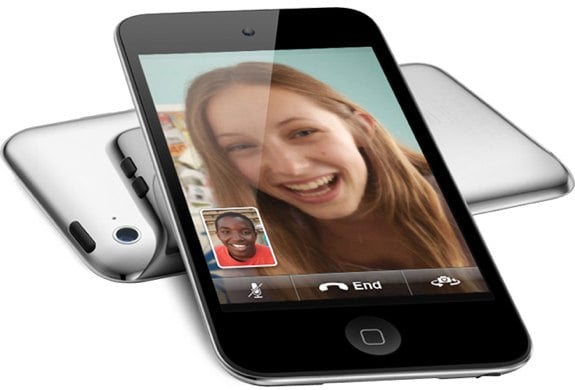
Showing posts with label ipod. Show all posts

Game On! Which Mobile Gaming Device is Right for You?

Sunday, February 20, 2011

      When you look through the store for a new mobile gaming device, you may see a few options. How do you know which one is the one you should be taking home?
      The two main players in the mobile gaming market are Sony, with it's Playstation Portable, and Nintendo, with it's DS. Both companies have announced a new model of their device which are not out currently. Nintendo's new model will be available March 27, 2011, while Sony's new device's release date is yet to be announced.

NINTENDO DS

      Nintendo's DS is geared towards more casual gamers. Pokemon, Mario, and Zelda work great with this device. There is a Call of Duty game on the DS, but the graphics aren't great, and there aren't many games like it on the DS.
      The DS uses two screens one on each half of the device. The device folds like a typical clamshell laptop. The top screen is usually where most of the action in a game happens, while the bottom screen, a capacitive touchscreen, is where additional data or controls usually go. On the two sides of the bottom screen are the  A,B,X, and Y buttons, while the other side houses the up, down, right, and left buttons.
      The DS is now in it's 4th generation, with the 5th, the 3DS, coming late March. The current model, the DSi XL, measures in at a pretty big 4.2 inches tall, and 6.34 inches across, and weighs about twelve onces.
      At a newly lowered price of $169.99 you get, along with the obvious ability of playing games, a front and rear facing camera (although no videochat), as well as some cool effects to add to your photos. The DSi XL includes a microphone, which, along with being useful for blowing up balloons in Mario Cart, can also be used to record sound clips, which can later be edited on the DS.
     The DS's online features allow for one to download games and add on's from the DSi Ware store. The device also includes a web browser.
     If you want all of the features of the DSi XL, but don't like the big size, the $149.99 DSi is fine.
     The game selection on the DS is pretty big, but is focused on casual games. Nintendo brings some exclusive games to the DS, like Mario and Pokemon.
     The next generation of the DS, the 3DS, is probably worth waiting until late March for. It's the first mobile gaming device with 3D capability. Read my review here for more info.

SONY PLAYSTATION PORTABLE
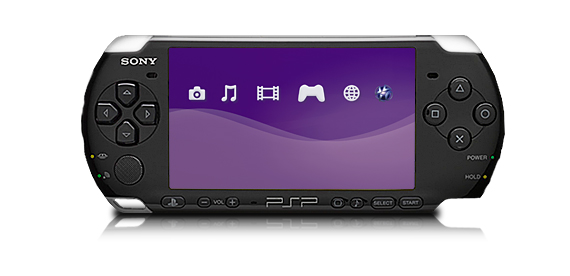
PSP 3000
     Sony's Playstation Portable, or PSP, is the device for more serious gamers. You'll get great graphics for games like Call of Duty, but casual games are harder to find. 
     The PSP is available in two models, the PSP 3000, and the PSP Go. The 3000 is a device about 6.7 inches across, and 2.7 inches tall. At 6.7 grams, the PSP 3000 is almost half the weight of the DSi XL, making it much more portable. 
     The PSP 3000 uses small CD-like disks for games and movies, but also has support for storing content on a memory card. 
     The front of the PSP 3000 houses the 4.3 inch screen, as well as the legendary Playstation buttons. On the other side of the screen is the up, down, left, and right buttons. A mini joystick can be found right under the directional buttons.
     With the PSP's built in WiFi, you can surf the net, download RSS podcasts, and even download and read comics. The PSP also allows you to remotely play games on your Plastation 3 (a device you hook up to the TV) that's at home.
PSP Go
     The PSP 3000 directly competes with the DSi XL with the MSRP of $169.99. For the same price as the DSi XL, you get more intense graphic capabilities, a built in microphone, a big 4.3 inch screen, and even the ability to make calls using Skype. 
     The PSP Go is almost identical in features to the PSP 3000, the main difference is the fact that you have to download games onto the device, as there is no disk drive. The Go also sports a slide out piece that houses the controls.
     Sony recently announced a new model of the PSP, known as the PSP2. This device sports a touchscreen and some more new features, but no pricing or release date information is available yet.

SURPRISE, THE IPOD TOUCH
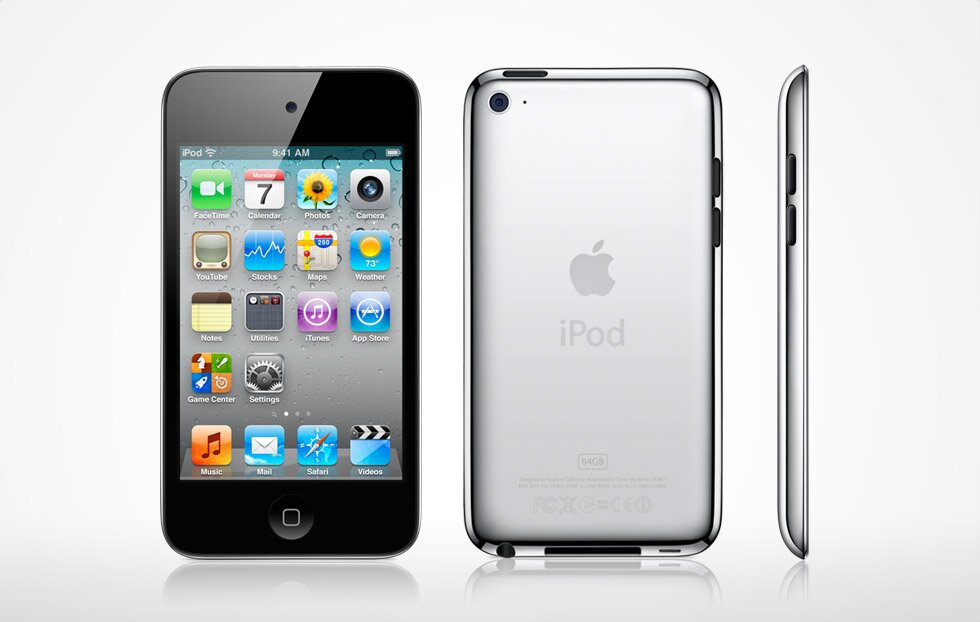
     Although most don't think of an iPod as a gaming device, the iPod Touch is close to outselling both the DS and the PSP. The iPod Touch is surprisingly good with games, but almost all of the games on the Touch are aimed at very casual games. 
     The iPod Touch is not only a gaming deice, and also allows you to install other apps to do things like read books, book airline tickets, and manage your calander. 
     See my review of the entire line of iPods for more details on the Touch here.

     Overall, the iPod Touch is great for the very casual gamer who also wants to listen to music, watch movies, and even be productive on their gaming device. For the gamer who wants a device mostly devoted to gaming, but still focusing on more casual games, the DS is a great device. The more extreme gamer should go with the PSP. While he PSP has the ability to play movies and other content, it's much better at gaming, and you'll probably find that that's all you're doing with it.

Apple Mac App Store

Sunday, December 26, 2010

     Over the past few years the idea of apps became very popular. You can now get iPhone apps from the iOS App Store, or Android apps from the Android Market (although you have to download them from your phone), you can even get apps for your Windows netbook with Intel's AppUp.
Mac App Store Running on a MacBook Air
     Apple, who kind of started the the app thing with it's iPhone and iPod Touch, is doing it again with a app store for the Mac. According to the Apple website, the Mac app store will be available for download on January 6th. It seems almost exactly like the iTunes app store for iOS, but the apps here are a lot more expensive.
     It seems that almost all of the Mac programs you can buy on the shelf at a computer store will be available for  download here. Some programs include iPhoto, GarageBand, Color Studio, and Home Watch.
     A similar program to the Mac App store exists already, called Bodega. Bodega can probably do almost everything the Mac app store can do, but must have a smaller selection.
Bodega 
     So what will the Mac app store give me that something like Bodega won't, and what benefit do I have by using this rather than going to the store and taking the software off the shelf? Why would I want to use the Mac app store?
Mac App Store Logo
     Firstly, coming from Apple, it will be a clean interface, a lot easier than surfing around the web for a download that might not even be there. Also, it will be a great place to find reviews, both good and bad, for the software.
    It seems good so far, but there a few reasons why you may want to stay away. If you have a slow internet connection, this is a bad idea. You don't want to spend hours waiting for a 1GB program to download. Also, Apple will probably have the same approval process here as they do in iOS. Apps may get pulled, and you might not be able to find the apps you want.
    So is this a good thing? For most, yes. But some may find themselves going back to the brick and mortar shops, and pulling that same old software off of those great metal shelves.

_______________________________________________________________________________________________

Want Gadgetator to write about a topic of your choice? Just leave a comment with a suggestion for a new post.


Best Sound for your iPod or iPhone

Monday, December 20, 2010

     I was recently asked in a comment on an earlier post what the best or very good sound system would be for an iPod or iPhone. After doing some research, I found out a few things. One of them: sound is expensive. For good sound and features, you'll have to pay somewhere around $200.
Soundfreaq Sound Flatform
    You can get a basic iPod dock player with some moderate features for about $30, but you won't get the same great sound quality and more advanced features that you might get with the more expensive products. Before you read any further, you should probably answer this one question: Am I willing to spend for sound? If you aren't, you'll probably just pay $30-$40 for something that will play your music, probably has a radio, and maybe even has an alarm clock.
     If you want great sound quality, some sound changing effects, and maybe Bluetooth capability, you'll have to be willing to pay for it.
     For a great looking device with great sound quality, I would recommend the Soundfreaq Sound Platform. It has Bluetooth capabilities, a cool boxy design, and an FM radio. It features a cool cabinet in the side for storing the remote. You can buy it on Amazon.com for $199.99, although it is currently "temporarily out of stock". CNET did a good video review which you can see below.


Soundfreaq Side View


     For more portability, great sound, but less extra features, the Logitech S715i is a good choice. It can easily fit into a backpack for bringing it with you, and can last about 8 hours on a charge. It is available on many sites, but Amazon.com has it for the cheapest of all, $99.99. CNET also did a video review on this, which you can view below.

Logitech S715i


     More good names to look into are Bose, which is known for great sound quality, Altec Lansing, also known for good sound quality, and Sony, which has some good looking devices for about $70.
    So if all you wan't your music to play aloud, pay $30 for a cheap device that does that fine. But if you care about high sound quality, spent a couple hundred dollars on something nice.

Choosing an iPod

Sunday, December 19, 2010

     Looking for an MP3 player? Trying to find what you need at the best value? So you looked at user reviews of the MP3 players out there. And you decide you'll go with an apple device. Now what?
    Apple makes 4 iPod devices. The iPod Classic, iPod Nano, iPod Shuffle, and the iPod Touch.
iPod Classic
    The iPod Classic will set you back $249, but gives you 160GB of storage. It does music, videos, and podcasts, along with games. It also includes a clock and some other basic features.
iPod Nano
    The Nano costs $149 for 8GB, or you can double the storage for an added $30. It, unlike its predecessor, only does music, podcasts, and radio (a feature not available on any other models). Its small touchscreen display  might be a little too small for one's fingers. For video recording and playback, you might want to check out the earlier edition (5th generation), but get it while you can.
iPod Shuffle
     The Shuffle is available at an inexpensive $45. For that you get 2GB of storage. The Shuffle was once available in 4GB, but it seems that currently only a 2GB version is available. The Shuffle can only do music and audio podcasts. It has no screen, so you have to organize your music in the right order on iTunes.
iPod Touch
     The iPod Touch is my recommendation. It is available in 8GB, 32GB, and 64GB, at prices of $229, $299, and $399, respectively. For only $80 more than the Nano, you get video recording and playback, two cameras, the ability to run apps, a web browser, and more. Pretty much everything you can do on an iPhone 4 you can also do on an iPod Touch.
     So if all you need is the ability to listen to some music, the Shuffle should be fine. For more features, get either the current Nano, or, I would recommend the previous one. For a lot of storage, and most of what the Nano can do, go with the Classic. But if you want a very useful, fun device that can do almost everything the above devices can do and more, choose the iPod Touch.

Below is a short video advertisement for the Apple iPod.


Search This Blog

Subscribe to Gadgetator by eMail

Most Popular

About the Author

Elazar Krausz founded Gadgetator in December 2010, and has been writing there ever since. To find out more, click below.
Online Marketing
Add blog to our blog directory.